
- Super Speedy Imports v1.99 — Development Update - March 18, 2026
- WooCommerce order search improved with Super Speedy Search - August 13, 2025
- Speed hacks for the Newspaper theme by tagDiv: Transform your site speed - February 19, 2025
Dev Version 1.99 released 3rd March 2026, with follow-up fixes through 18th March 2026
This has been one of the biggest development pushes for Super Speedy Imports yet. Version 1.99 introduces a parallel multi-worker architecture that makes large imports 4–8× faster, a completely revamped admin experience with real-time progress visuals, custom product attribute support for WooCommerce, and a raft of compatibility and quality-of-life improvements. Here’s everything that’s changed.
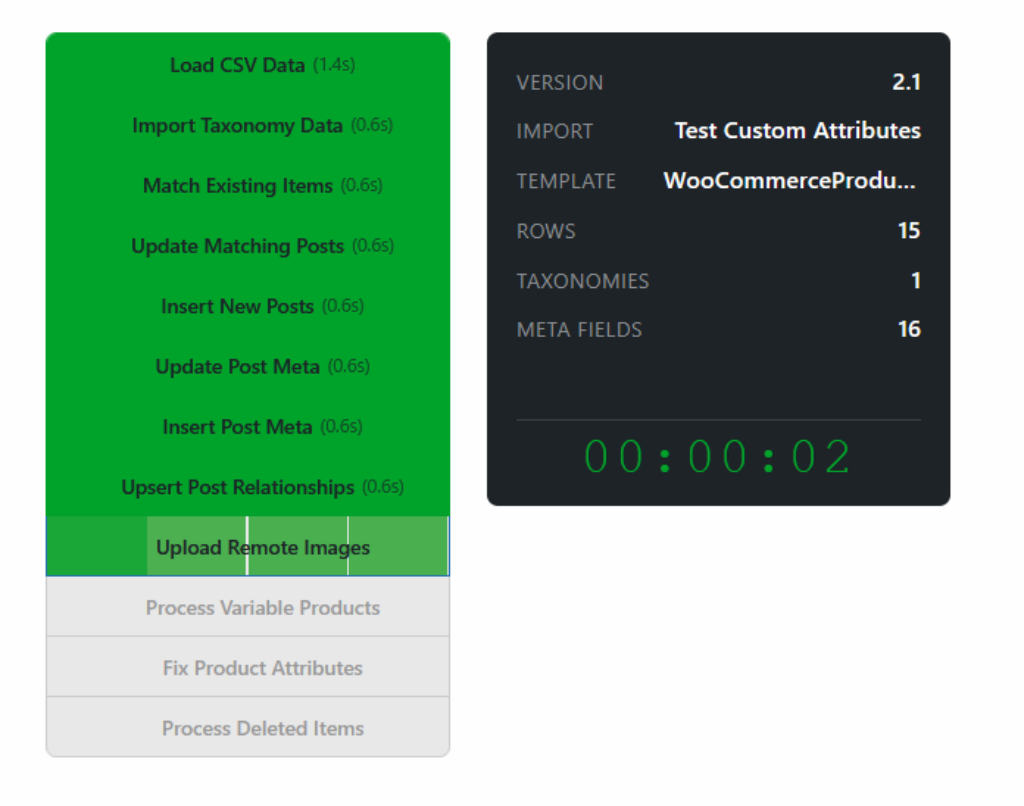
Table of Contents
- Multi-Worker Parallel Processing (4–8× Faster Imports)
- Revamped Admin UI with Real-Time Progress
- Import History Improvements
- Custom Product Attributes (WooCommerce)
- Multi-Stage Batching for Small Imports
- Polylang Default Language Assignment
- Smarter Default Taxonomy Handling
- Unique ID Support vs only SKU support
- PHP 8.4 Deprecation Warnings Fixed
- Other Fixes & Improvements
- What’s Next
Multi-Worker Parallel Processing (4–8× Faster Imports)
This is the biggest change in v1.99. The import engine now supports parallel multi-worker processing for both CLI and AJAX-triggered imports.
For stages that support it — CSV loading, image uploads, image attachment, gallery images, taxonomy imports, and attribute fixing — the importer splits the work into segments and runs multiple workers simultaneously. On the CLI side, this uses proc_open to spawn actual worker subprocesses, each handling a slice of the data. On the AJAX side, the browser fires concurrent REST requests that the server processes in parallel.
The result: imports with 10,000+ rows that previously took minutes now complete 4–8× faster, depending on the stage mix and server resources. The number of workers defaults to 4 but is configurable via the --workers flag on CLI.
Stages are classified as either parallel-capable or sequential. The orchestrator runs them in order, fanning out to multiple workers for parallel stages and falling back to single-threaded execution for sequential ones. A finalize step after each parallel stage collects results and tracks max IDs for subsequent stages that need them.
Revamped Admin UI with Real-Time Progress
The import admin interface has been completely overhauled:
- Select2 import selector — imports are now searchable and display richer metadata including the last run time and a direct link to import history
- Real-time progress visuals — when you hit Run Now, a full-screen progress dialog shows each stage as a coloured box that fills as workers complete. Parallel stages show individual worker progress bars side by side
- Live log output — the import log streams in real-time with auto-scrolling, so you can watch exactly what’s happening
- Stage-by-stage tracking — each stage transitions through pending → active → complete states with visual indicators
The progress UI works for both parallel and sequential stages, giving you the same visibility whether you’re running a 50-row test import or a 50,000-row production import.
Import History Improvements
The import history panel has been significantly enhanced:
- Filter by Import ID — in addition to filtering by import name and CSV filename, you can now filter by the numeric import ID and a link has been added to view the history to the top import summary
- Programmatic access — a new
ssiOpenHistoryForImport()JavaScript function lets other parts of the UI open and filter the history panel automatically (this powers the “view history” link on the import selector) - Improved summary data — the output summary has been restructured to capture more useful metrics including rows processed, term relationships created, and default assignments made
Custom Product Attributes (WooCommerce)
You can now import custom (non-taxonomy) product attributes — the kind that appear on the product page’s “Additional Information” tab without being registered as global WooCommerce attributes.
A new Custom Product Attributes section in the WooCommerce template configuration lets you:
- Add as many custom attributes as needed
- Map each one to a CSV column
- Set whether the attribute is visible on the product page
- Set whether the attribute is used for variations
For variation attributes, the importer automatically aggregates all distinct values from child variations. For non-variation attributes, it uses the value from the product’s own CSV row. Everything saves and loads with your import configuration as expected.
Multi-Stage Batching for Small Imports
While the multi-worker system speeds up large imports, small imports had the opposite problem: each stage dispatched as a separate AJAX request, and each request pays the WordPress bootstrap cost (~2.5 seconds). With 10+ stages, that’s 25+ seconds of pure overhead for an import that might only have 100 rows.
Version 1.99 introduces intelligent stage batching: after load-csv completes, the importer checks how long it took. If it finished in under 10 seconds (a proxy for a small import), consecutive non-parallel stages are bundled into a single REST call. This eliminates roughly 15 seconds of overhead on smaller imports. The server accepts comma-separated stage names and runs them sequentially within one request, while the progress UI still shows each stage completing individually.
Polylang Default Language Assignment
If you’re running Polylang and your import doesn’t include a language taxonomy mapping, the importer now automatically assigns the site’s default language to all newly imported posts. This only applies to posts that don’t already have a language assigned, so price/stock-only update imports won’t overwrite existing language settings.
Smarter Default Taxonomy Handling
The logic for assigning default terms to hierarchical taxonomies has been tightened up. Previously, the importer would fall back to the term with the lowest term_id in the taxonomy — which could assign unexpected defaults. Now it only uses explicitly configured defaults:
- WordPress core
default_categoryoption - WordPress 5.5+
default_term_{taxonomy}option - Plugin conventions like WooCommerce’s
default_product_cat
If no default is configured, the taxonomy is simply skipped rather than guessing. The stage also now logs how many default term assignments were made, giving you visibility into what happened.
Unique ID Support vs only SKU support
A new unique ID system has been added to improve how the importer matches CSV rows to existing posts. This gives you more flexibility in how imports identify and update existing content, particularly useful for WooCommerce products where SKU isn’t always the right match key.
PHP 8.4 Deprecation Warnings Fixed
A fix was applied to the shared settings framework to resolve nullable parameter deprecation warnings introduced in PHP 8.4. If you’re running PHP 8.4, you’ll no longer see these notices in your logs.
Other Fixes & Improvements
- Fixed “view products affected by this import” link — the link now correctly filters to show only products from the specific import
- CSS cleanup — the import dialog is now full-width and full-height with a flex layout, making the log output much easier to read
- Config migration tool — a new utility to help migrate import configurations between environments
- Free trial license handling — added authentication manager for free trial access
What’s Next
We’re continuing to push on performance, WooCommerce-specific features, and making the admin interface as informative as possible. We want the main plugin to become fully open source with some parts as optional paid add-ons and with the open-source code will provide more development guides that make it as easy as possible for people to create templates or functions to import whatever they wish using this awesome import framework.
If you have feature requests or run into any issues with v1.99, reach out via Discord or email or comment directly on this article.