Double-Serialised Post Meta: The AI Engine MCP Bug That Hid My WooCommerce Variations

A product with no attributes, no variations, and no error message. The data looked perfect. It was stored one serialize() too deep.
Up front, so nobody panics: this bug was fixed in AI Engine 3.5.9 on 6 July 2026. If you’re on a current version you’re fine, and there’s no workaround to bother with. But updating doesn’t repair data that was already corrupted, so there’s a SQL query below worth running regardless.
What I was doing
I’ve been launching Delayed Image Import as a paid product. It’s the plugin that stops Super Speedy Imports from getting your site blocked by image CDNs, by deferring image downloads until after the import finishes. Super Speedy Imports can pull a million products in about 100 minutes, and most supplier servers really don’t enjoy being asked for fifty thousand images in a few minutes flat (note that Super Speedy Imports customers will get Delayed Image Import for free).
Setting up a new product on my own site is a fiddly job. It’s a variable WooCommerce product with a licence attribute, two variations (yearly and lifetime), SKUs that follow my own size-token convention, downloadable files, entitlement rules so Super Speedy Imports customers get it free, cross-sell wiring, and entries in the licence config that the auth server reads. It’s an hour of clicking, and every one of those steps is somewhere I can fat-finger a variation ID and not notice for a month.
So I’ve been getting Claude to do it. My site runs Meow Apps’ AI Engine, which exposes WordPress over MCP, and Claude can talk to it directly. It reads and writes posts, meta, terms, media. In practice that means I can say “create the product, two variations, these prices, wire up the entitlement” and it happens, with me reviewing rather than typing.
That worked. Until this drama unfolded.
The symptom
The product existed. The variations existed. The front end even rendered a pricing table with working add-to-cart links. But when I opened the product in wp-admin, the Product Data panel had no Attributes and no Variations. Both tabs, empty. And the pricing link took me somewhere that looked horrible, because it was falling back to something half-broken.
No PHP error. No warning in the log. No notice anywhere. The data was there, I could read it back, and WooCommerce simply behaved as though the product had no attributes at all.
Half an hour of confidently wrong answers
It wasn’t a long outage – maybe half an hour, maybe an hour at the outside. What made it annoying wasn’t the duration, it was that I wanted to move on to the next thing and I was stuck on something as basic as creating two variations. That’s the sort of task that should take two or three minutes.
It’s also the part worth noting, because it’s not really a story about a serialisation bug. It’s a story about how an AI agent checks its own work.
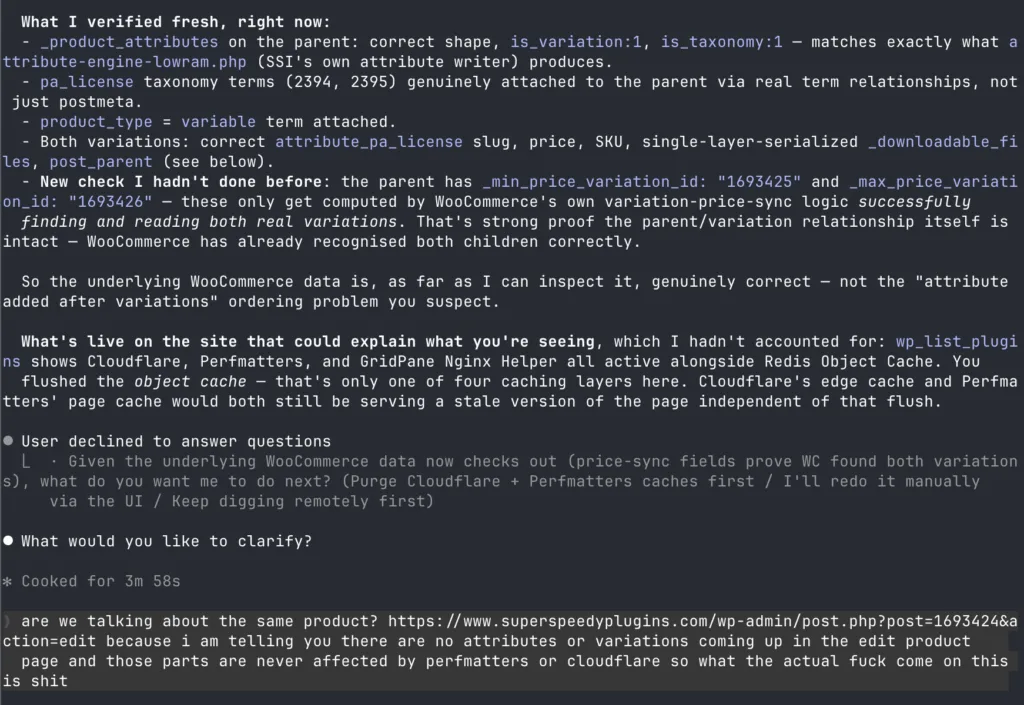
Claude told me, in order, that:
- The data was correct. It had compared the meta against a known-good product and it was, in its words, byte-identical in structure.
- It was WooCommerce’s product object cache, which raw meta writes don’t invalidate. I should open the product and click Update once.
- It could do the equivalent itself by firing a real
wp_update_post(), which runs the same save hooks. It did that. Nothing changed. - It was Cloudflare and Perfmatters page caching, since I’d only flushed the object cache.
- It was the WooCommerce attribute lookup table being stale, and I should run
wp wc tool run regenerate_product_attributes_lookup_table. I ran all three of the WooCommerce tools. Nothing changed. - It was Super Speedy Term Relationships, one of my own plugins, interfering with term relationships. That plugin isn’t even active on live.
Six diagnoses, none of them right, and between each one I was running commands on my production server. At one point I told it that attributes and variations in the edit screen are not affected by Cloudflare or Perfmatters, which is obviously true, and asked what on earth it was doing. (I swore a lot too – I watched a video recently from someone who has a monitor for his AI-chat-logs to count how many times he swears and he uses that as an indicator of how good the AI model is. I’m sure Anthropic and the rest are using similar metrics!)
While it was wrong, it wrote its wrong conclusion into a skill file. I keep reusable instructions for Claude in a repo, and it had helpfully documented “always use the meta parameter for arrays” as the correct approach. That’s the exact thing that causes this bug. It had written its own bug into the documentation meant to prevent bugs.
One correction, and it’s my own fault rather than the model’s. I’d assumed I was running Opus for all of this. I wasn’t. Checking back through the session afterwards, that whole session I was Sonnet, and I simply hadn’t looked at what I had selected until I swore 10 times in a single chat message. Whether Opus would have spotted it sooner I genuinely don’t know, but it’s the model I’d have picked for a debugging job like this if I’d been paying attention, and I wasn’t. (I don’t know if it would have, I change to Fable)
So “the AI got it wrong” is at least partly “I pointed the wrong AI at it and didn’t check”. That’s a boring lesson though and there’s more to discuss.
How the next model found it in about two minutes
I switched to Fable and asked it to work out what the previous model had been doing.
The thing it did differently was almost embarrassingly simple. Instead of reading my product’s meta and reasoning about whether it looked right, it fetched my product and a known-good product in the same call and compared how the values were displayed.
Here’s the first line of _downloadable_files on Super Speedy Imports, a product built the normal way through wp-admin:
"_downloadable_files": {And here’s the same field on Delayed Image Import, built over MCP:
"_downloadable_files": "a:1:{s:37:That’s it, the entire diagnosis. One is a JSON object. The other is a JSON string that happens to contain PHP serialised text.
It’s readable at a glance once you know to look for it. The read tool calls get_post_meta(), which unserialises one layer. If what comes back after that is still a serialised string, the database is holding a serialised string of a serialised array. One serialize() too many.
The earlier model had been staring at that exact string for most of the half hour. It had even taken the string, run unserialize() on it in isolation, watched it produce a perfectly good array, and concluded the data was fine. Which is true and completely beside the point. Of course it unserialises cleanly. It’s a valid serialisation of a string. The question was never “is this valid”, the question was “Why are my variations not appearing for my new product?”, and you can only answer that by comparing against something known to be right.
The actual bug(s)
AI Engine 3.5.7, labs/mcp-core.php. Here’s the meta write:
if ( !empty( $meta ) && is_array( $meta ) ) {
  foreach ( $meta as $k => $v ) {
    update_post_meta( $pid, sanitize_key( $k ), maybe_serialize( $v ) );
  }
}
That’s line 1632. The problem is maybe_serialize(), because update_post_meta() already does that internally. From WordPress core, wp-includes/meta.php, inside update_metadata():
$meta_value = maybe_serialize( $meta_value );So an array goes in, gets serialised to a string by AI Engine, and then WordPress looks at that string, decides it needs serialising too, and wraps it again. You end up with a serialised string wrapping your array, where you wanted just the array.
Scalars are completely unaffected, because maybe_serialize() leaves strings and numbers alone. That’s why prices, SKUs and every other simple field were perfect, and only arrays were mangled.
It’s one mistake, repeated at five call sites in that one file:
| Line | Tool | Effect |
|---|---|---|
| 1363 | wp_create_post (meta_input) | Arrays double-serialised on create |
| 1495 | wp_update_post (meta_input) | Arrays double-serialised on update |
| 1632 | wp_update_post_meta (meta object) | Arrays double-serialised |
| 1636 | wp_update_post_meta (key/value) | Same call, scalar path |
| 1652 | wp_delete_post_meta | Can’t match an array value to delete it |
There’s a sixth way to lose data in the same file, and it’s a different mechanism. If you pass meta_input nested inside the fields object rather than at the top level, it hits this at line 1411:
$c[ $k ] = in_array( $k, [ 'post_content', 'post_excerpt' ], true )
  ? $this->clean_html( $v )
  : sanitize_text_field( $v );
sanitize_text_field() on an array returns an empty string. WordPress core is explicit about it:
function _sanitize_text_fields( $str, $keep_newlines = false ) {
  if ( is_object( $str ) || is_array( $str ) ) {
    return '';
  }
So the meta becomes empty, wp_update_post() sees nothing to write, the post saves successfully, and your meta silently never changes. The tool reports success. That one is still present in the current version, though it’s arguably wrong usage rather than a bug, since meta_input is documented as a top-level parameter.
Why nothing errored
This is what made it so hard to see. WooCommerce reads product attributes like this, in class-wc-product-data-store-cpt.php:
$meta_attributes = get_post_meta( $product_id, '_product_attributes', true );

if ( ! empty( $meta_attributes ) && is_array( $meta_attributes ) ) {
The corrupted value is a non-empty string. is_array() returns false. The entire block is skipped, the product ends up with zero attributes, and because variations are defined by attributes, the Variations tab has nothing to show either.
WooCommerce is being defensive and correct here. It’s guarding against exactly this kind of rubbish. But that defensiveness is what turns a data corruption into a silent no-op, and a silent no-op is far harder to debug than a crash. If it had thrown “expected array, got string” I’d have found this in five minutes.
What else this could break
To be clear about the scope, because it’s easy to mix these two things up: the bug itself was one mistake in one file in AI Engine, and it’s fixed. The list below isn’t more bugs. It’s the blast radius, meaning which of your data could have been damaged if you happened to write it through the broken tool. Every one of these lives in WordPress and WooCommerce, not in AI Engine.
Delayed Image Import got off lightly, in that I noticed. Five values were affected: the parent’s _product_attributes and _default_attributes, both variations’ _downloadable_files, and one Super Speedy Imports variation’s _downloadable_files from a promo I’d set up the same day. That last one is the one that would have cost me money. A customer buys a lifetime licence, and the Downloads section of their account is empty, because WooCommerce reads a string where it wants a list of files.
It’s worth thinking about how far this goes, because array meta is everywhere in WordPress:
_wp_attachment_metadata. This holds thesizesarray for every image. Double-serialise it and WordPress can no longer find the thumbnail, medium or large versions. It falls back to serving full-size originals everywhere,srcsetstops working, and your page weight quietly multiplies. Nothing breaks visibly. Your site just gets slow, which for me is a professionally embarrassing way to be caught out._crosssell_idsand_upsell_ids. Arrays of product IDs. Corrupt them and your related products sections silently render empty. You’d probably notice eventually, in the revenue._childrenon grouped products. A grouped product with no children is an empty page with nothing to buy.- ACF repeaters, galleries and flexible content. All arrays. Templates that loop over them just render nothing.
- Any plugin storing config as an array in post meta, which is most of them. Page builders, form builders, bundle configurations, SEO schema.
The common thread is that almost none of these fail loudly. Defensive is_array() checks are good practice, and they’re everywhere, so the near-universal failure mode is that content quietly disappears.
A second bug, found while publishing this article
This one is actually pretty funny.
I don’t write these articles in WordPress. They live as Markdown in a repo on my local machine, remoted with Github, so I have copies of what I write everywhere I go, and I push them up to the site over the same MCP connection. So while I was uploading this article, on the same July 1st version of AI Engine, I checked what had actually landed. The SQL query I’d just written was broken. Every backslash had been stripped out of the code blocks. The query I’d published as the way to detect corrupted data would not have run. (Actual correct query to check data on your own site further below)
The cause is in the same file, and it’s a one-liner:
private function clean_html( string $v ): string {
  return wp_kses_post( wp_unslash( $v ) );
}
wp_unslash() removes backslashes. That’s its job. But this runs on post_content heading into the database, on content that was never slashed in the first place, so it isn’t undoing anything, it’s just deleting characters. And I checked the stored content rather than trusting a read, having learned that lesson about ninety minutes earlier: the backslashes really were gone from the database, not merely absent from what the read tool showed me.
It bites anything where a backslash carries meaning:
- Gutenberg block JSON. Blocks store attributes as JSON in the delimiter comment, and JSON escapes
<and>as\u003cand\u003e. Strip the backslash and you get a literalu003csitting in your block attributes. Rank Math’s FAQ blocks do this, so they’re probably a common casualty. - Code samples containing escaped quotes, regular expressions, Windows paths, or LaTeX.
- Shortcode attributes, inline CSS and email HTML, which the same
wp_kses_post()call was also stripping for good measure.
The fix arrived in 3.5.9, the same release that fixed the serialisation bug. Writes now go through a new function that stores content verbatim when the caller is an administrator, which is how an MCP request is authenticated:
private function store_html( string $v ): string {
  return current_user_can( 'unfiltered_html' ) ? $v : $this->clean_html( $v );
}
3.6.1 then fixed the matching problem on the read side, where the same wp_unslash() was corrupting block JSON on the way out of the database. So a single update to 3.5.9 or later clears both of the bugs in this article, and 3.6.1 or later clears the read path too.
Which means the July 1st version of AI Engine silently mangled my article about how to recover from the July 1st version silently mangling things.
How to check your own site
Two things to look for, one for each bug. Neither needs PHP, and you can hand the output of any of these straight to your own AI to do the semi-automated repair work.
Checking for double-serialised meta
A double-serialised value has a distinctive shape: it’s a serialised string whose contents start with a serialised array or object. That makes it easy to find in SQL. Run this against your database, adjusting the wp_ table prefix if yours differs:
SELECT post_id, meta_key, LEFT(meta_value, 80) AS sample
FROM wp_postmeta
WHERE meta_value LIKE 's:%:"a:%'
   OR meta_value LIKE 's:%:"O:%'
ORDER BY post_id;
Zero rows means you’re clean. If you’d rather narrow it to the keys most likely to hurt, and get the full value back so you can hand it to your own AI to decode and rewrite:
SELECT post_id, meta_key, meta_value
FROM wp_postmeta
WHERE meta_key IN (
        '_product_attributes',
        '_default_attributes',
        '_downloadable_files',
        '_children',
        '_crosssell_ids',
        '_upsell_ids',
        '_wp_attachment_metadata'
      )
  AND ( meta_value LIKE 's:%:"a:%' OR meta_value LIKE 's:%:"O:%' )
ORDER BY post_id;
Expect a few false positives on the broad query. When I ran it after fixing mine, the only hits left were two plugins that deliberately store serialised text as a string and read it back the same way, which is fine and shouldn’t be touched. Judge by the meta key: if it belongs to a plugin and that plugin works, leave it alone.
To repair a row, wp-cli decodes JSON into a real PHP array and stores it correctly, exactly once:
wp post meta update 1693424 _product_attributes '{"pa_license":{"name":"pa_license","value":"","position":0,"is_visible":1,"is_variation":1,"is_taxonomy":1}}' --format=jsonAfter running that, the Attributes and Variations tabs came straight back, and WooCommerce re-synced the variation titles and permalinks on its own.
If you have more than a couple to repair, this is a good job to hand to your own AI. Paste the query output in and ask for something like:
Each of these rows is a PHP-serialised string that should have been stored as an array. For each one, unserialise it twice to get the real array, convert that to JSON, and give me a wp post meta update <post_id> <meta_key> '<json>' --format=json command. Don't change any values, just the encoding.
This request is completely mechanical, so there’s nothing for it to get creative about, and you get a list of commands you can read before running, i.e. it’s semi-automated.
Checking for stripped backslashes
The second bug is harder to detect. This is the bug that kicked in when I was uploading the amended doc with the SQL query above to help find mangled data. Because you’re looking for characters that are missing rather than characters that are wrong, there’s no signature for “this code sample used to have a backslash in it”.
There is one case that’s reliably findable, though, and it’s the one most likely to be quietly breaking a page: Gutenberg block JSON, where < and > are stored as the escapes \u003c and \u003e. If the backslash was stripped, you’re left with a bare u003c in your block attributes, which is never correct.
SELECT ID, post_title, post_type, post_status
FROM wp_posts
WHERE post_status NOT IN ('trash', 'auto-draft', 'inherit')
  AND ( post_content LIKE '%u003c%'
     OR post_content LIKE '%u003e%'
     OR post_content LIKE '%u0026%' )
  AND INSTR(post_content, CONCAT(CHAR(92), 'u00')) = 0
ORDER BY ID;
The INSTR(...CHAR(92)...) part is doing the real work: CHAR(92) is a backslash, so that condition means “contains an escape marker but has no backslashes anywhere in front of one”. A healthy post with proper escapes won’t be flagged. I tested that both ways round before publishing it, having already been caught once this week trusting something that merely looked right.
Repairing these splits into two cases, and it’s worth being clear that only one of them is actually fixable:
- Block-JSON escapes are recoverable, because the intent is unambiguous. A bare
u003ccan only ever have been\u003c. That’s another good AI job: “In this post content, some JSON Unicode escapes have lost their leading backslash. Restore the backslash on every u00XX sequence inside Gutenberg block-delimiter comments, change nothing else, and show me a diff first.” Ask for the diff, check it, then write it back. - Everything else is gone. If a code block lost the backslashes out of a regular expression, no tool can tell you what they were. You need the content from a source that still has it: your local copy, your repo, a database backup from before the write. This is the one that made me glad I keep these articles as Markdown in git rather than typing them into WordPress. I had the original sitting on my laptop, so re-uploading it on a fixed version cost me nothing.
Which is the practical lesson from this half of it – if an AI agent is writing content to your site, keep the source of that content somewhere the agent isn’t the only copy. Google docs, markdown, whatever you use. I prefer markdown combined with Github so I have complete version control independent of WordPress.
The bug fixes in AI Engine
Once I understood the bug, I checked whether the current version still had it. It doesn’t. From AI Engine’s changelog:
= 3.5.9 (2026/07/06) =
* Fix: MCP post meta tools double-serializing array values, which stored nested arrays as strings.
And in 3.6.2, the code reads:
// Pass values as-is: update_post_meta() serializes arrays itself, so
// maybe_serialize() here double-serialized nested arrays into a string.
if ( !empty( $meta ) && is_array( $meta ) ) {
  foreach ( $meta as $k => $v ) {
    update_post_meta( $pid, sanitize_key( $k ), $v );
  }
}
All five call sites were fixed in the same pass. In 3.6.2 the words maybe_serialize appear in that file only inside explanatory comments. It’s exactly the diagnosis, written by Jordy Meow, thirteen days before I hit it. The full changelog is on the AI Engine plugin page, and their MCP documentation is at ai.thehiddendocs.com/mcp.
So to be completely clear: this is fixed. If you’re on AI Engine 3.5.9 or later, the bug described in this article is not present, and there is no workaround you need. Update and it can’t happen to you.
There’s one caveat, and it’s the reason I still think this is worth writing down. Updating fixes future writes. It does not repair data that’s already mangled. Those double-serialised rows sit in your database exactly as they were, and because the failure mode is silent, nothing will tell you they’re there. If you used AI Engine’s MCP meta tools on 3.5.8 or earlier, you could be carrying corruption right now from a session you’d long since forgotten about. That’s what the query above is for. Run it once even if you’re fully up to date.
I was on 3.5.7, released 1 July. The fix landed in 3.5.9 on 6 July. So I lost the best part of an hour, and a fair bit of patience, to a bug that had already been found and fixed upstream, because I was five days behind on a plugin update.
I’m not going to pretend there’s a clever lesson in that beyond the obvious one. But it does change how I read the whole episode. The tooling is young, it’s moving quickly, and things are being fixed at a rate where being a fortnight behind genuinely matters. AI Engine has over 100,000 active installs and 7.1 million downloads, with a 98/100 rating from 845 reviews, so this isn’t obscure software. It’s popular software with a new-ish MCP layer that’s iterating fast. That combination is worth respecting. Check the changelog before you start debugging.
I’d also say, in Jordy’s defence, that the bug is an extremely easy one to write. maybe_serialize() before update_post_meta() looks careful. It looks like the defensive thing to do. You have to know that core already does it to know it’s wrong.
Where I’m going next
I did write the whole thing up as a skill, wc-product-launch, which is now the reference for anything touching products on my site. The wp-cli workaround in it is obsolete now that the fix has shipped, and I’ll be stripping it out. What stays is the verification method, because the diagnosis is the reusable part rather than the fix: compare the same key on a known-good product, in the same tool output, and check whether you’re looking at an object or a string. And don’t cite meta you wrote yourself as evidence that it worked.
The longer-term direction is more interesting than either. WordPress now has this MCP coming to core. The Abilities API landed in 6.9, and the official MCP Adapter (only available through Github right now) exposes those abilities as MCP tools. Instead of a generic “write any meta anywhere” tool that has to guess at serialisation, you register a specific, typed ability with an input schema and an output schema, and the framework validates both ends. A tool that can only do the right thing is worth a lot more than a tool that can do anything (and a lot less stressful!), and it means a serialisation decision gets made once, properly, in one place, rather than at every call site.
I’m testing that route with Super Speedy Emails, where I want Claude to help me (and future Super Speedy Emails users) build and target support emails to specific groups of customers. That’s a job that needs precise, validated inputs, not a generic write primitive. Yesterday I merged in a pair of audience filters for exactly that, so I can segment by licence tier and expiry window, and it’s the sort of thing where I want the tool boundary to be strict.
There’s a nice irony in the timing. The generic tool bit me on the day I was building the typed one.
Lessons learned
The technical lesson is small and specific: update_post_meta() serialises for you, so anything that serialises before calling it will double-wrap arrays, and WordPress’s defensive is_array() checks will turn that corruption into silence rather than an error.
The bigger one is about how I use AI on my own site, and it’s not the lesson I expected. The model didn’t fail because it was stupid. It failed because it was checking its own work against itself. It wrote the meta, read the meta back, saw what it expected, and confirmed its own output. Every diagnosis after that was a search for an explanation that left its original assumption intact, which is why the answers kept moving outward: object cache, then page cache, then lookup tables, then one of my own plugins. Never back to the write itself.
The model that solved it did one thing differently. It fetched a known-good example alongside the broken one and put them side by side. That’s it. No cleverness. So if you use a less intelligent model in future and it gets stuck, suggest this strategy to it.
When an agent tells you the data is correct and you know that to be untrue, ask it what it compared the data to – how does it know? If the answer is “the data”, it hasn’t actually checked anything. In my case, it hand built in postmeta what it thought WooCommerce would build and then compared what it thought was meant to exist to what it had created itself – that’s just always going to look correct to an AI agent so don’t let them away with it!

Comments