Index WP MySQL For Speed vs Scalability Pro
Want faster results? Try Scalability Pro on your store.
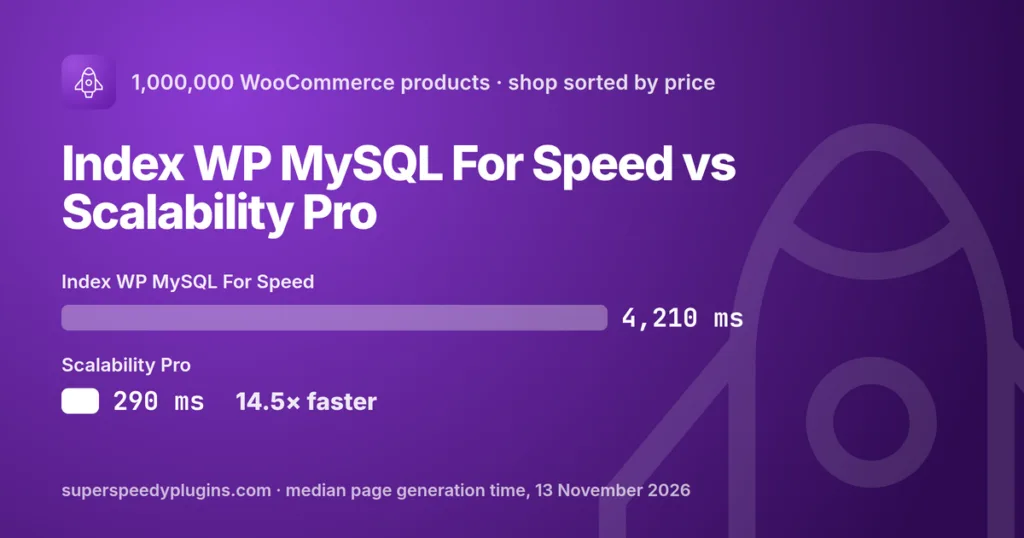
Get Scalability Pro →Index WP MySQL For Speed vs Scalability Pro, in one line: Index WP MySQL For Speed is a free, well-made plugin that replaces WordPress’s database keys with better ones. Scalability Pro adds its own indexes, rewrites the slow queries WordPress and WooCommerce send, and serves product listings from its built-in Archives table. On a 1,000,000-product WooCommerce store, sorting the shop took 4.2 seconds with Index WP MySQL For Speed and 0.29 seconds with Scalability Pro.
Last updated: 13 November 2026. Tested with Index WP MySQL For Speed 1.6.0 and Scalability Pro 6.45.1.
Overview of Index WP MySQL For Speed
Index WP MySQL For Speed is written by Oliver Jones (OllieJones on wordpress.org), with rjasdfiii as a contributor, and its readme credits “Rick James for everything”. It has been on wordpress.org since June 2021, has more than 50,000 active installations, and holds 4.8 out of 5 from 99 reviews. It is free, GPL licensed, and the code is on GitHub. There is no paid edition; it takes donations through GitHub Sponsors.
What it does is narrow and done well. It replaces the default keys on wp_posts, wp_postmeta, wp_options, wp_users, wp_usermeta, the comment and term meta tables, and WooCommerce’s order meta tables with keys designed for how WordPress actually queries them. It can revert to the standard keys at any time, it has a wp index-mysql WP-CLI command for large tables where the dashboard would time out, and it includes a query monitor that samples page views and lists the slowest queries.
Visit Index WP MySQL For Speed →
What the two have in common
Both start from the same idea: WordPress’s default database indexes were designed for a blog, and they fall over on a large store. Both add better indexes and both can remove them again. On the wp-admin product editor, where the default keys are at their worst, the two plugins produce almost identical results.
Where they differ
Indexes only, or indexes and queries. Index WP MySQL For Speed changes keys and nothing else. That has a hard limit: if a query is badly shaped, a better key cannot fix it. Scalability Pro also rewrites queries as they are sent. It removes redundant GROUP BY and DISTINCT clauses, replaces the count WordPress runs to render “page 1 of 5,000”, and adds indexes for specific WooCommerce lookups such as the attribute filter table and the queries every RSS feed runs.
Sorting a large catalogue. A sorted shop page is slow in WordPress because the sort value lives in a different table from the product, so MariaDB has to read and sort a huge number of rows to find the first 16. No index on the existing tables changes that, which is why Index WP MySQL For Speed left the price, popularity and rating sorts at 4.1 to 4.3 seconds. Scalability Pro’s Archives table keeps one row per product with the columns the shop sorts and filters on, indexed in the order the shop asks for them, so the database reads the first page straight off the index. Those sorts took 253 to 290 ms, 14.5 to 16.8 times faster than Index WP MySQL For Speed.
The plain shop page too. The unsorted shop, the shop sorted by newest, page 50 of the shop and the product category page were all 2.6 to 3.3 times faster than with Index WP MySQL For Speed. The shop for a logged-in customer went from 1.9 seconds to 271 ms.
Generic keys can choose the wrong plan. We added a numeric custom-field filter to the shop, the kind of query filter plugins send for stock or sale price. With Index WP MySQL For Speed, the stock filter went from 1.7 seconds to 37.0 seconds, and the sale price filter from 0.7 seconds to 36.9 seconds. The SQL was identical; its postmeta keys changed the plan MariaDB chose. Scalability Pro served the stock filter in 441 ms, because Enable good settings found the slow filter in the Performance Analysis history and added the stock field to the Archives table.
The sale price filter is the one page where Scalability Pro did not win. The sale prices hold decimals, but the filter compares them as whole numbers, which WordPress does by truncating each price. A typed copy of that field would include and exclude different products from WordPress, so Scalability Pro declines to serve it and leaves WordPress’s own query in place. That page took 754 ms, against 712 ms with WordPress’s default keys. A filter that compares prices as decimals can be served.
More than the database. Scalability Pro also handles options autoloading, unloading plugins a request does not need, and cron and heartbeat control. Index WP MySQL For Speed deliberately stays out of those areas.
Benchmark: 1,000,000 WooCommerce products
Every configuration was measured on the same evening from one restore of the same server snapshot: 1,000,000 products in 425 categories, WordPress 7.1.2, WooCommerce 11.1.2, MariaDB 10.11.17 and PHP 8.2.34, on a 4 vCPU Hetzner server with 7.6 GB of RAM. Index WP MySQL For Speed 1.6.0 had keys enabled on every table it supports. Scalability Pro 6.45.1 was configured only by Enable good settings (wp spro recommended), with no hand tuning. Super Speedy Performance Analysis measured each page, and the figures are median server page-generation times from three samples after a warm-up. Each of the 30 pages we checked for correctness returned the same products in the same order as WordPress default, apart from products tied on the sort value itself.
| Page | WordPress default | Index WP MySQL For Speed 1.6.0 | Scalability Pro 6.45.1 | Scalability Pro vs Index WP |
|---|---|---|---|---|
| Shop sorted by price | 4,227 ms | 4,210 ms | 290 ms | 14.5× faster |
| Shop sorted by price, high to low | 4,405 ms | 4,205 ms | 282 ms | 14.9× faster |
| Shop sorted by popularity | 4,098 ms | 4,131 ms | 257 ms | 16.1× faster |
| Shop sorted by rating | 4,311 ms | 4,253 ms | 253 ms | 16.8× faster |
| Shop sorted by newest | 645 ms | 721 ms | 244 ms | 3.0× faster |
| Shop, first page | 937 ms | 968 ms | 297 ms | 3.3× faster |
| Shop, page 50 | 973 ms | 961 ms | 324 ms | 3.0× faster |
| Shop, logged-in customer | 1,959 ms | 1,932 ms | 271 ms | 7.1× faster |
| Product category | 754 ms | 737 ms | 282 ms | 2.6× faster |
| Category sorted by price | 578 ms | 572 ms | 292 ms | 2.0× faster |
| Category sorted by popularity | 591 ms | 561 ms | 318 ms | 1.8× faster |
| Shop filtered by colour | 2,186 ms | 2,142 ms | 825 ms | 2.6× faster |
| Shop filtered by colour and size | 1,846 ms | 1,915 ms | 885 ms | 2.2× faster |
| Category filtered by colour | 574 ms | 606 ms | 465 ms | 1.3× faster |
| Stock filter (custom field, 1 to 5) | 1,707 ms | 37,018 ms | 441 ms | 83.9× faster |
| Sale price filter (custom field, 10 to 20) | 712 ms | 36,908 ms | 754 ms | 48.9× faster |
| Price range filter (10 to 20) | 566 ms | 573 ms | 494 ms | level |
| RSS feed | 2,633 ms | 659 ms | 85 ms | 7.8× faster |
| Edit product (wp-admin) | 1,682 ms | 236 ms | 241 ms | level |
| New product (wp-admin) | 1,601 ms | 271 ms | 250 ms | level |
The headline: on a 1,000,000-product store, Scalability Pro served the shop sorted by price in 290 ms, where Index WP MySQL For Speed took 4,210 ms. That is 14.5 times faster, with nothing configured by hand.
Neither plugin changed front-end search (about 1.5 to 1.7 seconds) or the wp-admin product search (about 5.2 seconds); Super Speedy Search is the fix for search, so it is not part of this comparison. The wp-admin products list and the post editor stayed within 10% in every configuration. Pages under 300 ms, such as the home page, cart, checkout and single products, varied more between runs than between plugins.
Every page we measured (54 pages)
| Page | WordPress default | Index WP MySQL For Speed 1.6.0 | Scalability Pro 6.45.1 |
|---|---|---|---|
| Product search (wp-admin) | 5,199 ms | 5,269 ms | 5,215 ms |
| Shop sorted by price, high to low | 4,405 ms | 4,205 ms | 282 ms |
| Shop sorted by rating | 4,311 ms | 4,253 ms | 253 ms |
| Shop sorted by price | 4,227 ms | 4,210 ms | 290 ms |
| Shop sorted by popularity | 4,098 ms | 4,131 ms | 257 ms |
| RSS feed | 2,633 ms | 659 ms | 85 ms |
| Shop filtered by colour | 2,186 ms | 2,142 ms | 825 ms |
| Shop, logged-in customer | 1,959 ms | 1,932 ms | 271 ms |
| Shop filtered by colour and size | 1,846 ms | 1,915 ms | 885 ms |
| Stock filter (custom field, 1 to 5) | 1,707 ms | 37,018 ms | 441 ms |
| Edit product (wp-admin) | 1,682 ms | 236 ms | 241 ms |
| Search, no results | 1,635 ms | 1,703 ms | 1,703 ms |
| New product (wp-admin) | 1,601 ms | 271 ms | 250 ms |
| Search, many results | 1,544 ms | 1,527 ms | 1,649 ms |
| Shop, page 50 | 973 ms | 961 ms | 324 ms |
| Shop, first page | 937 ms | 968 ms | 297 ms |
| Products list (wp-admin) | 800 ms | 824 ms | 811 ms |
| New post (wp-admin) | 767 ms | 796 ms | 800 ms |
| Product category | 754 ms | 737 ms | 282 ms |
| Edit post (wp-admin) | 753 ms | 827 ms | 745 ms |
| Products list by category (wp-admin) | 721 ms | 715 ms | 706 ms |
| Sale price filter (custom field, 10 to 20) | 712 ms | 36,908 ms | 754 ms |
| Shop sorted by newest | 645 ms | 721 ms | 244 ms |
| Category sorted by popularity | 591 ms | 561 ms | 318 ms |
| Category sorted by price | 578 ms | 572 ms | 292 ms |
| Category filtered by colour | 574 ms | 606 ms | 465 ms |
| Price range filter (10 to 20) | 566 ms | 573 ms | 494 ms |
| Category sorted by price, high to low | 554 ms | 585 ms | 299 ms |
| Category sorted by rating | 551 ms | 552 ms | 330 ms |
| Category sorted by newest | 408 ms | 454 ms | 294 ms |
| Category + price range filter | 373 ms | 385 ms | 362 ms |
| Out of stock filter | 298 ms | 324 ms | 318 ms |
| Single product, logged-in customer | 216 ms | 213 ms | 323 ms |
| Product categories (wp-admin) | 214 ms | 209 ms | 217 ms |
| Order search (wp-admin) | 213 ms | 183 ms | 197 ms |
| Posts list (wp-admin) | 212 ms | 237 ms | 281 ms |
| Plugins (wp-admin) | 209 ms | 217 ms | 220 ms |
| Single product | 207 ms | 211 ms | 222 ms |
| Media library (wp-admin) | 204 ms | 164 ms | 202 ms |
| Dashboard (wp-admin) | 203 ms | 173 ms | 235 ms |
| Colour terms (wp-admin) | 201 ms | 165 ms | 190 ms |
| Attributes (wp-admin) | 200 ms | 205 ms | 198 ms |
| Checkout | 196 ms | 159 ms | 189 ms |
| Cart | 191 ms | 164 ms | 202 ms |
| Single post | 190 ms | 163 ms | 193 ms |
| 404 page | 181 ms | 136 ms | 144 ms |
| My orders, customer | 180 ms | 144 ms | 176 ms |
| Orders (wp-admin) | 172 ms | 158 ms | 213 ms |
| My account, logged out | 157 ms | 128 ms | 172 ms |
| Home page | 155 ms | 157 ms | 190 ms |
| Blog category | 145 ms | 168 ms | 185 ms |
| REST API posts | 140 ms | 140 ms | 120 ms |
| My account, customer | 138 ms | 133 ms | 171 ms |
Feature comparison
| Index WP MySQL For Speed | Scalability Pro | |
|---|---|---|
| Price | Free | from €79.00 per year |
| Active installations | 50,000+ | Sold directly, not listed on wordpress.org |
| Better indexes on WordPress tables | Yes | Yes |
| Indexes on WooCommerce lookup tables | Order meta tables | Attribute lookup, SKU lookup and others |
| Pre-sorted product listing table for shop sorts and filters | No | Yes, built in (Archives) |
| Rewrites slow queries | No | Yes |
| Faster pagination counts | No | Yes |
| Slow query monitor | Yes, built in | No; measurement is done by Super Speedy Performance Analysis |
| Revert to standard keys | Yes | Yes |
| WP-CLI | Yes | Yes |
| Options autoload, plugin unloading, cron and heartbeat | No | Yes |
| Support | wordpress.org forum, answered by the author | Direct Discord access to the developer |
What its users say
Its reviews are overwhelmingly positive. On 15 June 2026 fff654 titled their review “divided by 2 my CPU load” and added “GUI is excellent on what it does, and how to revert.” The same review gives a useful warning for shared hosting: adding keys to the post and meta tables timed out from the dashboard and had to be done from the command line.
Negative reviews are few and old. The most detailed, from November 2022, “Crashed my website when trying to RESTORE”, reports that the site “was slower” after adding keys and ends “Install with caution!”. The author replied the same day offering to investigate.
When Index WP MySQL For Speed is the better choice
If your site is mostly posts, pages and users rather than a big product catalogue, start with Index WP MySQL For Speed. It costs nothing, the wp-admin editor gains were as large as Scalability Pro’s in our test, and its query monitor is a good way to find out what is actually slow. If you do not sell anything and your budget is zero, it is the right first step.
When Scalability Pro is the better choice
When the slow pages are your shop: sorting, attribute filters, category pages and feeds on tens or hundreds of thousands of products. Those pages are slow because of the queries and the table layout, not just the keys, and that is where Scalability Pro made the difference in our test. It is also the safer choice if your store uses a custom-field filter for stock, sale price or similar.
Switching
Revert Index WP MySQL For Speed’s keys first, using its own wp index-mysql disable command, then deactivate it. Running both is not recommended, because two sets of indexes on the same columns give MariaDB more ways to pick a bad plan. Then install Scalability Pro and run Enable good settings. On our 1,000,000-product test store that took about an hour, most of it building the Archives table. The table is built alongside the live one and swapped in when it is complete, so the shop keeps working while it builds.
The bottom line
Index WP MySQL For Speed is a good free plugin, and its fixes to wp-admin are real. On a big WooCommerce store, though, the slow pages are the shop pages, and better keys did not speed those up in our test. On custom-field filters they made pages more than 20 times slower. Scalability Pro made the sorted shop pages about 15 times faster, the plain shop and category pages about 3 times faster, and the stock filter 84 times faster than Index WP MySQL For Speed.
Frequently asked questions
Is Index WP MySQL For Speed safe to use?
Yes. It only changes indexes, never your data, and it can restore WordPress’s standard keys at any time. Test custom-field filters on your own shop after enabling it, because that is where we saw a large slowdown.
Can I use Index WP MySQL For Speed and Scalability Pro together?
You can, but we do not recommend it. Both add indexes to the same tables, and overlapping indexes make it harder for the database to choose a good plan. Pick one.
Does Scalability Pro speed up search?
No. Neither plugin changed search times in our test. Fast product and admin search is what Super Speedy Search is for.
What do others say about Scalability Pro?
This plugin made the websites for my clients quite faster, something other "speed" plugins couldn't do. If you need one "speed" plugin, it's this one! You only need to keep in mind that to achieve this, you switch off some calculations and some options you might need. So you have to read carefully the description of what the option does.
I ordered the WPI Performance Plugin and I´m absolutly impressed. I never thought that I can get that speed on my site. I´m planing to build more sites and shure I will buy the WPI Performance Plugin for that sites too.
I have a site with many products and heard about Scalability Pro and after installing this plugin my site got blazing fast. I recommend this anytime for everybody who want fast woocommerce site. Thanks to Dave for support.
Useful links
- Scalability ProFeatures, pricing and the 60-day money-back guarantee
- Customer reviewsEvery review, not just the ones shown above
- Knowledge baseSetup guides, settings reference and troubleshooting
- ChangelogEvery release, so you can see how actively it is developed
- Discord supportTalk directly to the developer, usually answered in minutes
- ArticlesWrite-ups and development notes
- Other comparisonsHow it stacks up against the rest of the market
Related products


Want faster results? Try Scalability Pro on your store.
Get Scalability Pro →
Comments