Sharing Your Recipes
When your AI agent makes your store cache-safe, it often writes recipes of its own: small fixes for plugins the recipe library does not cover yet. Sharing them with Super Speedy turns your store’s fixes into library recipes for every store, and once a recipe is in the library, we keep it up to date as the plugin changes.
Available since Cache Upgrader 1.7.13.
- The recipes your agent wrote, from your “Cache Upgrader: Custom Cache Recipes” plugin.
- Your agent’s chat log, or a summary of it. It tells us why each recipe exists, what was tried first, and what you decided. A summary is enough.
- A short note, if you want to say anything to us.
- The names and versions of your active plugins and theme, sent with every share so we can reproduce what the recipes handle.
Nothing you send is run or published as it is. Every recipe is reviewed by hand and rewritten as a generic library recipe before it reaches any other store.
Open Super Speedy → Ajax and the Cache Upgrader tab, then scroll to Share with Super Speedy.
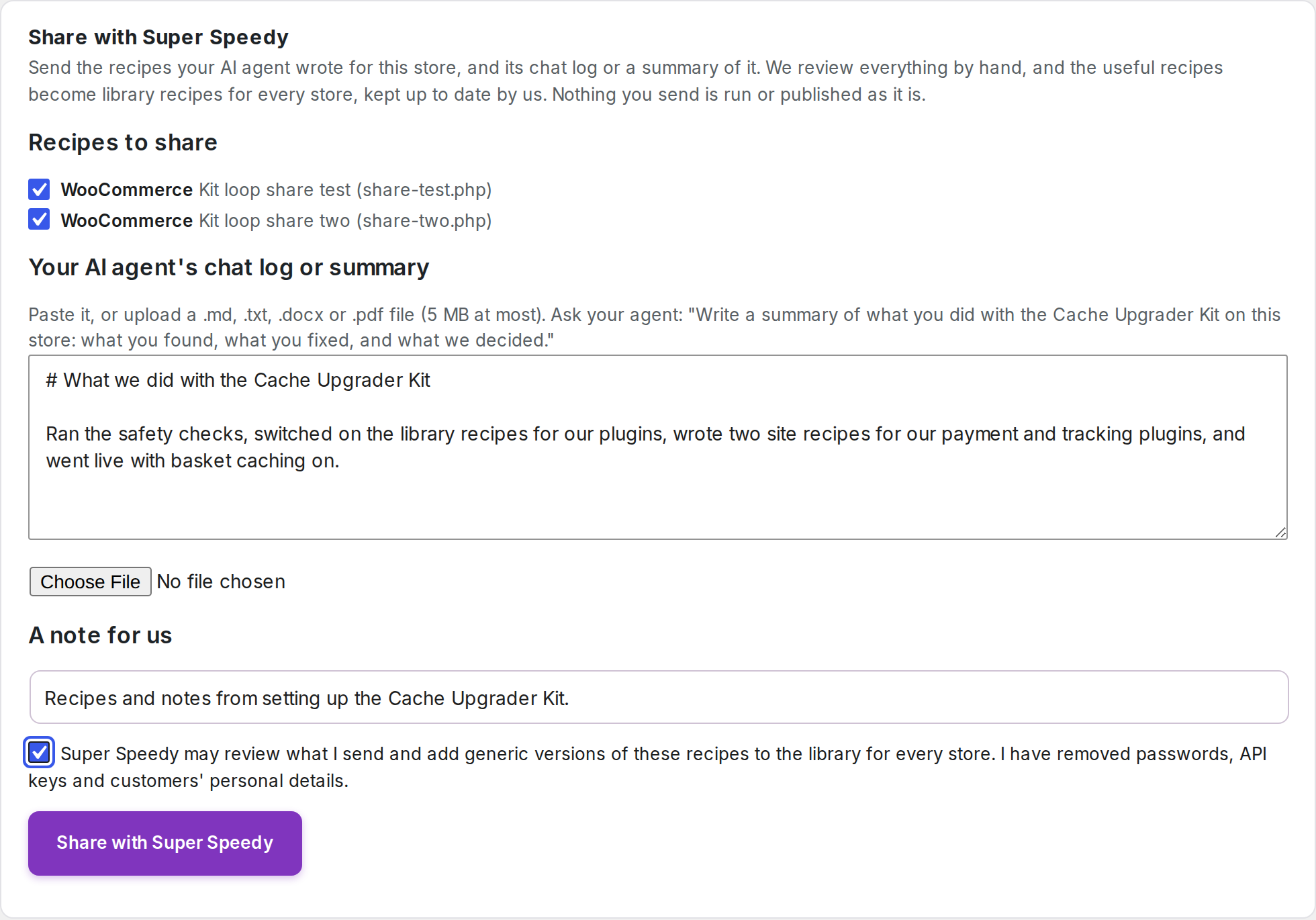
- Recipes to share: every recipe your agent wrote is ticked. Untick any you would rather keep to yourself.
- Your AI agent’s chat log or summary: paste it, or upload a
.md,.txt,.docxor.pdffile of up to 5 MB. - A note for us: optional.
- Tick the consent box, then press Share with Super Speedy. The panel shows a reference; quote it if you write to us about the share.
To get a summary, ask your agent: “Write a summary of what you did with the Cache Upgrader Kit on this store: what you found, what you fixed, and what we decided.”
Or ask your agent
Tell your agent “Share the recipes you wrote with Super Speedy, with a summary of what we did.” It asks you to confirm, then sends the recipes and its summary in one share and gives you the reference.
What to leave out
- Passwords, API keys and licence keys. Remove any from a chat log before you share it.
- Your customers’ personal details, such as names, email addresses or order details.
Your store’s address, product IDs and plugin settings are fine to leave in. We rewrite every recipe before it joins the library.
What happens next
- We review what you sent. Recipes for plugins other stores use are rewritten as generic library recipes, tested, and released in a Cache Upgrader update.
- Your store gets the library version the next time your agent fetches a build for your site. Once the library covers a plugin, your agent can switch on the library recipe and remove its own copy, so future fixes for that plugin come from us.
Further reading
Written for Cache Upgrader for WooCommerce 1.7.13.
Fixing this on a real store?
Cache Upgrader Kit for WooCommerce does it for you.

Comments