Super Speedy Imports and Lite: feature comparison
Super Speedy Imports ships in two editions from one codebase. Super Speedy Imports is the paid edition sold on superspeedyplugins.com. Lite is the free edition (branded “Super Speedy Imports Lite” because wp.org bans “Free” in a plugin name). Lite shares the import code for supported features, with the paid features removed. Check the release version as well as the edition when comparing downloads.
This article lists every difference so you can see exactly what you get in Lite and what the paid edition includes.
Check compatibility before buying
Super Speedy Imports requires WordPress 6.9 or later and PHP 8.0 or later. WooCommerce is required for product imports, but not for posts, pages or custom post types.
The product importer covers simple, variable, downloadable and external/affiliate products. It does not import grouped products, orders, customers or coupons. Variable products, downloadable products and external/affiliate products require the paid edition.
Your source can be CSV or XML. The plugin can also migrate supported saved WP All Import jobs. Check the release version as well as the edition because the public GitHub Lite download may be older than the current paid edition.
Visual workflow and release availability
Both editions provide a WordPress interface for setting up, mapping and running supported imports. A terminal isn’t required for the ordinary browser workflow. Super Speedy Imports adds the broader destinations and advanced tools listed below.
The public GitHub Lite download is 2.84; XML and WP All Import migration require 2.87 or later and aren’t included in that public Lite package.
In Super Speedy Imports, open Migration Tools to upload XML or convert a supported saved WP All Import job. XML is converted internally for the visual mapper while remaining the source. Review migration differences and the first-item draft before running.
In one line
Lite imports Posts and WooCommerce simple products, with taxonomies and a single featured image, using its shared import engine. Super Speedy Imports adds variable products, product attributes and galleries, custom post types, ACF/SCF and custom field writing, term metadata (term descriptions, term images, swatch colours), custom PHP function mapping, scheduling, CSV export (Beta), the taxonomy import/export tools, image-size selection and the performance-tuning panel.
What Lite includes (free)
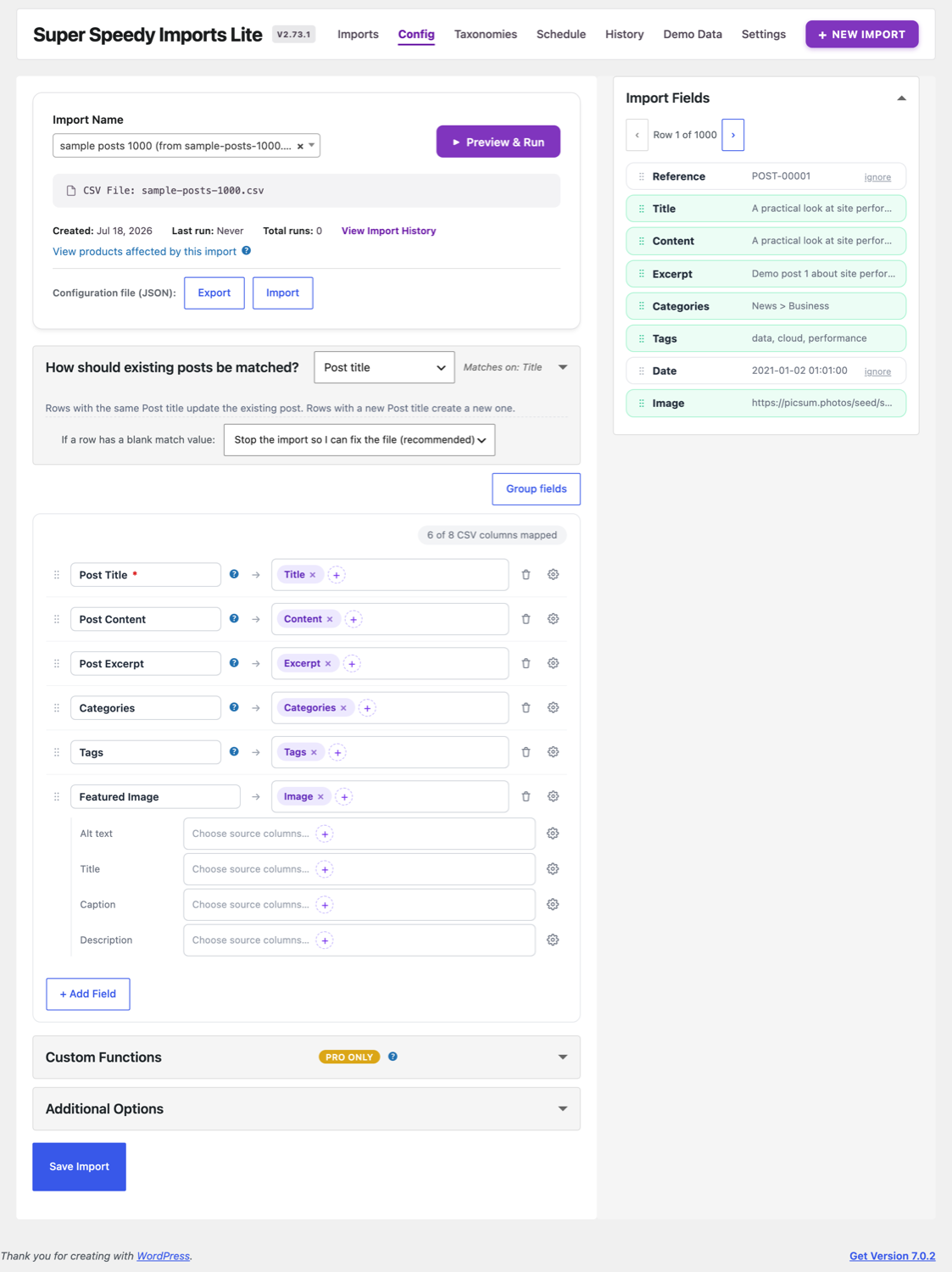
- Import Posts (any of title, content, excerpt, categories, tags, one featured image, and the image’s alt/title/caption/description).
- Import WooCommerce simple products.
- Taxonomies, including WooCommerce global attribute taxonomies (
pa_color,pa_size, and any otherpa_*) on simple products. - A single featured image per item.
- The full mapping GUI: the field-mapping rows, the Import Fields side panel, grouped/ungrouped views, match-field selection and blank-match handling.
- Config Export / Import (the JSON config buttons on the Config screen that save and load an import’s field mapping). This is not the CSV export feature below.
- Demo Data: the Posts (1,000 and 20,000) and simple-products sample imports.
- Email alerts on completion and the daily summary, and the
superspeedyimports_import_run_complete/ import-complete hooks. - Concurrent browser workers in every edition. GitHub Lite also keeps the direct-mysqli path and multi-process CLI workers where the host supports them.
What the paid edition adds
| Feature | Lite | Super Speedy Imports |
|---|---|---|
| Posts import | Yes | Yes |
| WooCommerce simple products | Yes | Yes |
Taxonomies + pa_* attribute taxonomies | Yes | Yes |
| Single featured image | Yes | Yes |
| Config (JSON) export/import | Yes | Yes |
| Email alerts + completion hooks | Yes | Yes |
| Parallel workers / import speed | Yes (GitHub Lite) | Yes |
| WooCommerce variable products | No | Yes |
| Product galleries (multiple images) | No | Yes |
| Custom (non-taxonomy) product attributes | No | Yes |
| Custom Post Type imports | No | Yes |
| Custom Fields (ACF / SCF) writing | No | Yes |
| Post Meta mapping | No | Yes |
| Term metadata (descriptions, term images, swatches) | No | Yes |
| Custom PHP function mapping | No | Yes |
CSV Export (Export tab + wp ssi export) | No | Yes |
| Scheduled imports | No | Yes |
| Taxonomy import/export tools | No | Yes |
| Image-size selection (skip unwanted sizes) | Lite generates all sizes | Yes |
| Performance Options panel (per-stage tuning) | No | Yes |
| Beta features panel (incl. the Setup checklist) | No | Yes |
Paid features in detail
- Variable products: the variable/attribute engine and the parent-product synthesiser. Lite has no variable-product stages, so a variable-product CSV is out of scope there.
- Product galleries: attaching more than the single featured image to a product.
- Custom product attributes: free-text, non-taxonomy attributes. Note the taxonomy attributes (
pa_*) are a free feature and stay in Lite; only the custom-attribute engine requires the paid edition. - Custom Post Type imports: Lite imports Posts and WooCommerce simple products; importing into arbitrary custom post types requires the paid edition.
- Custom Fields / Post Meta: writing to ACF/SCF field groups and custom post meta. Lite still detects your ACF/SCF field groups and shows them in a locked “Custom Fields” preview, so you can see what an upgrade would let you map.
- Term metadata: the “+ Term data” rows under each taxonomy or attribute mapping, which write term descriptions, term images (downloaded and attached, e.g. brand logos or category thumbnails) and any
wp_termmetakey (swatch colours for filter plugins, SEO fields, and so on) onto the terms your import creates. In Lite the “+ Term data” adder is visible but locked with a paid-feature badge. - Custom PHP functions: the “Custom Functions” mapping that runs a snippet per row. This is the only
eval()in the plugin and is stripped entirely from Lite (a hard wp.org rule); it shows as a locked paid-feature section. - CSV Export (Beta): exporting a post type back out to a re-importable CSV, both the Export tab and
wp ssi export. In Lite the tab appears as a locked “Export Beta” preview. - Scheduled imports: the cron scanner and schedule-save that run an import on a timetable. The Schedule tab’s email alerts are free; scheduled execution requires the paid edition.
- Taxonomy import/export tools: the tools that export and re-import taxonomy trees. Re-registering imported taxonomies stays in Lite; the export/import handlers require the paid edition.
- Image-size selection: Lite regenerates all registered WordPress image sizes for every image. Super Speedy Imports lets you pick exactly which sizes to generate and skip the rest, which is faster on large imports.
- Performance Options: the Settings panel that tunes worker counts and per-stage batch sizes. Lite shows the full tuning panel greyed out with a paid-feature badge, so you can see exactly which knobs Super Speedy Imports adds; the controls are disabled and the save is refused server-side.
- Beta features: the Settings panel that toggles opt-in betas (CSV Export and the Setup checklist). Lite shows the panel greyed out with a paid-feature badge; the toggles cannot be enabled or saved in Lite.
How Lite presents paid features
GitHub Lite shows paid features as greyed-out previews with a gold badge, so you can see what the paid edition adds and where. The WordPress.org build omits those previews and the paid implementation files. Both free builds use the name “Super Speedy Imports Lite”.
Two Lite builds (a note for wp.org)
There are actually two Lite packages built from the same free split:
- GitHub Lite (self-hosted, distributed from GitHub) keeps the update checker, direct-mysqli path and parallel
proc_openCLI workers. - wp.org Lite additionally removes those, because wp.org forbids phone-home updates and rejects the low-level functions the fast paths use. Its CLI worker path runs in-process through
$wpdb; browser execution has separate concurrency. This describes a build variant, not verified WordPress.org listing availability.
Both Lite builds use the same streamed WordPress HTTP downloader for images. Feature scope (which fields and products they can import) is identical; their interface, update mechanism and execution paths differ.
Written for Super Speedy Imports 2.95.2.

Comments