Quick Start Guide
Price Discounts is an add-on for Super Speedy Ajax that puts WooCommerce products on sale in two ways:
- Discount rules, on the Discounts tab, give every matching product a sale price: the whole store, a category, a brand, a tag, an attribute or a hand-picked list of products. When the rule ends, every product gets its own price back.
- The Sale prices tab sets each product’s own Sale price field in bulk, for prices that belong to particular products.
This guide gets your first sale running in about five minutes.
Available since 0.1.0. Requires Super Speedy Ajax 1.9.3 or later, and WooCommerce.
Before you start
- Super Speedy Ajax 1.9.3 or later is installed and active. Without it, Price Discounts activates but does nothing, and shows “Price Discounts needs Super Speedy Ajax 1.9.3 or later” with a link to download it from your account.
- WooCommerce is active, and the products you want to discount have a regular price.
Create your first sale
- Click Create a sale on the add-on’s row in Plugins, or go to Super Speedy > Ajax and open the Discounts tab.
- Click Create your first sale (once you have rules, the button reads Add a discount rule).
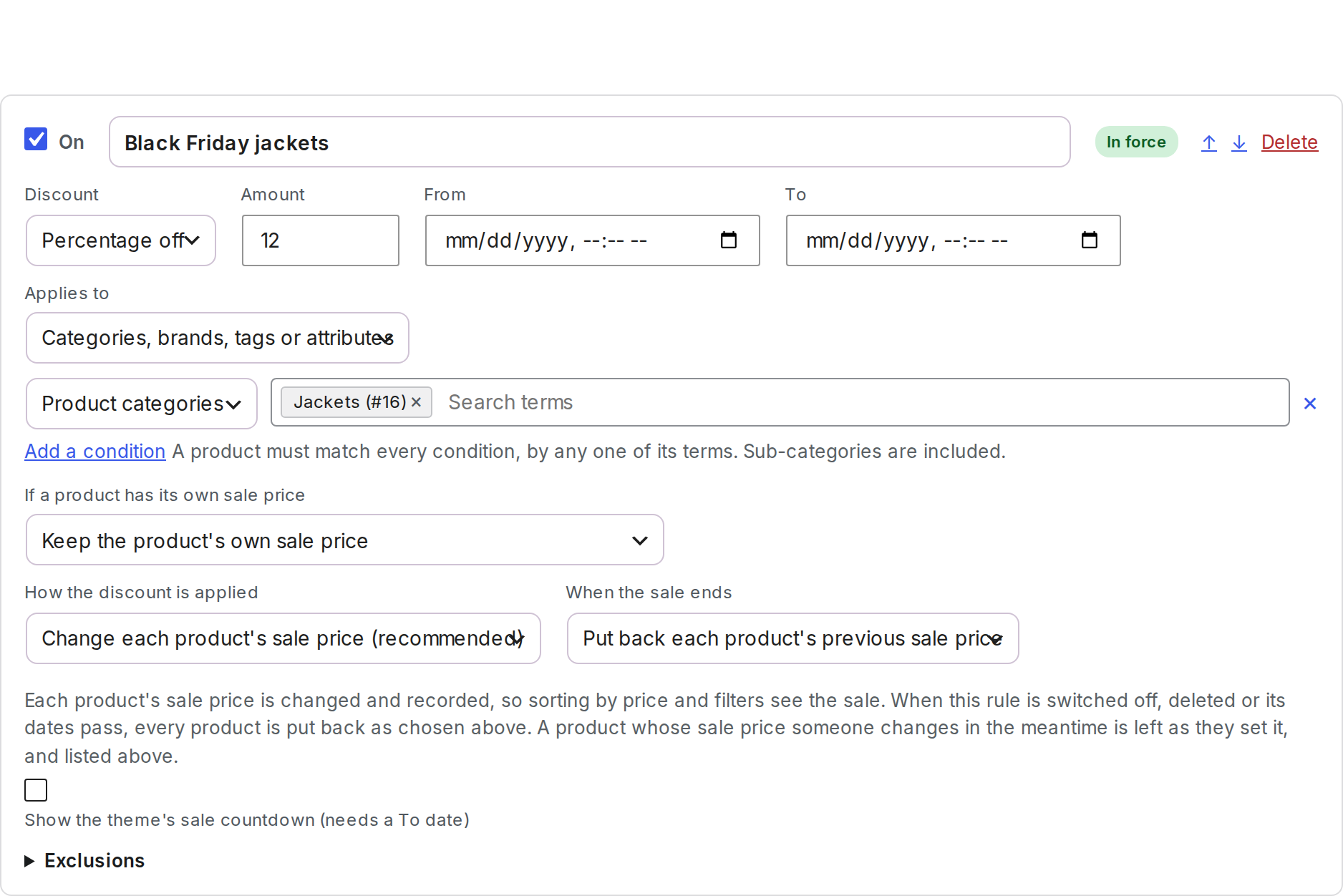
- Give the rule a name, for example “Black Friday jackets”. Shoppers never see the name; it is shown to you on the product edit screen and the Sale prices tab.
- Choose the Discount type (Percentage off, Fixed amount off or Fixed price) and enter the Amount.
- Choose what the rule Applies to. For a category, choose Categories, brands, tags or attributes: a condition on Product categories is added for you, so type the category’s name and pick it. The line under Applies to says what the rule covers, for example “Covers 11 products (19 including variations); 1 keeps its own sale price.”
- Optionally set From and To dates and times.
- Leave How the discount is applied on Change each product’s sale price (recommended), so price sorting and price filters see the sale.
- Click Save Settings.
Go LIVE
Super Speedy Ajax starts in TEST mode, and in TEST mode shoppers do not see any rule. A rule that would otherwise be in force shows TEST mode, and a banner above the rules says “Shoppers do not see these rules yet.”
- Click Preview the sale. Your shop opens through Super Speedy Ajax’s secret test link, so you see exactly what shoppers will see.
- Click Go LIVE. This switches Super Speedy Ajax on for every visitor (per-visitor prices, stock and basket) and writes the sale prices. The tab shows “Writing sale prices…” and then how many products have a sale price set by a rule.
If your Super Speedy Ajax is LIVE when you save the rule, skip this step: the sale prices are written as soon as you save.
A rule that says TEST mode is working. It is waiting for Super Speedy Ajax to go LIVE, and nothing is wrong with the rule.
Check it worked
- The rule shows In force next to its name, or Scheduled until its From time.
- On the Products list, every product the rule discounts has a purple tag with the discount beside its price.
- On the shop, those products show the regular price struck through, the sale price and the theme’s sale badge.
- Sorting by price and the price filter use the sale price.
Which tab to use
| You want | Use |
|---|---|
| A sale that starts and ends by itself and puts every product back afterwards | A rule on the Discounts tab |
| A sale price that belongs to particular products until you change it | The Sale prices tab |
| A short flash sale where sorting and filtering by price do not matter | A rule set to Display only |
Next steps
- Discount rules covers every setting on a rule, including dates, exclusions and products that have their own sale price.
- Real sale prices or display only explains the two ways a rule applies its discount.
- Page cache purging covers cached pages when a sale starts and ends.
Further reading


Written for Super Speedy Ajax – Price Discounts 0.4.3.
Comments