When a sale ends
A rule that changes sale prices records every change it makes, and puts each product back when the sale ends. This article covers what each product gets back, what happens to a price someone edits by hand during the sale, and what deactivating the add-on does.
Available since 0.4.0.
When a sale counts as ended
A rule’s sale ends for a product when:
- the rule’s To time passes;
- you switch the rule off, delete it, or change it so it stops covering the product;
- the product leaves the rule, for example by moving out of the rule’s category, or by being added to its exclusions;
- a rule higher up the list starts covering the product;
- Super Speedy Ajax goes back to TEST mode, or Price Discounts is switched off under Advanced > Add-ons;
- Price Discounts or Super Speedy Ajax is deactivated.
What each product gets back
Every change is recorded with the product’s own sale price and sale dates from before the rule. Each rule has a setting, When the sale ends:
| Choice | What each product gets |
|---|---|
| Put back each product’s previous sale price (default) | Its sale price and sale dates from before the rule. A product with none gets none; a sale it had booked for later comes back as booked. |
| Remove the sale price | No sale price at all, whatever it had before. |
Remove the sale price suits a clearance where products should go back to full price afterwards, including any that had an old sale price of their own.
Prices edited by hand are left alone
If someone changes a product’s sale price while a rule’s sale is running, the rule stops managing that product. It does not overwrite the new price during the sale, and it does not put the product back afterwards. The person who typed the price decided what the product costs, and the rule respects that.
Each one is listed on the Discounts tab under Edited since, not put back, showing:
- the product;
- the rule;
- the price the rule set;
- the sale price now;
- the product’s sale price before the rule;
- when the change was noticed.
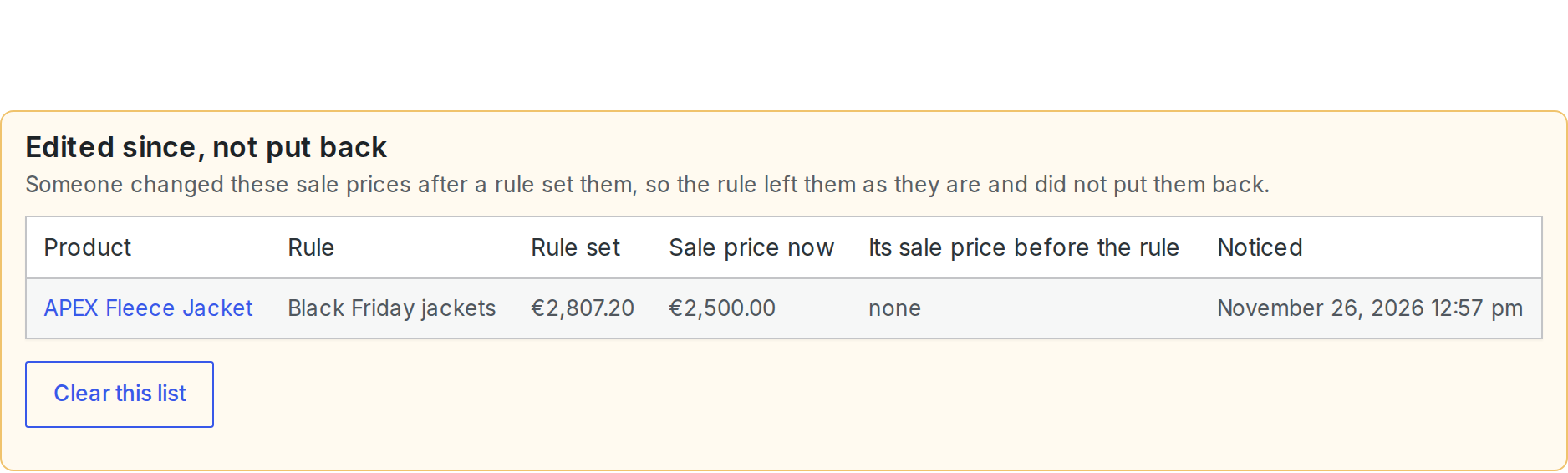
Check each product, change any price that should be different on the product’s own screen or the Sale prices tab, then click Clear this list. Clearing the list changes no price.
A product edited by hand stays out of that rule until the sale ends. If the same rule runs again later, it discounts the product again.
A rule with Show the theme’s sale countdown ticked writes its end time into each product. When that time passes, WooCommerce’s own scheduled sales may remove the sale price before the rule gets to it. That is not a hand edit: the product still gets back what When the sale ends says.
Deactivating the add-on
Deactivating Price Discounts, or Super Speedy Ajax, puts every product a rule changed back first, apart from those edited by hand. It runs WooCommerce’s save hooks for them there and then, so feeds and search indexes see the prices go back. On a large sale, the deactivation takes a little longer for that reason.
Your rules are kept. Reactivate the add-on and shoppers see every rule that is in force straight away; the add-on’s hourly check then writes those rules’ sale prices into the products again.
Switching every rule off
Advanced > Add-ons on the Super Speedy Ajax settings page has a checkbox for Price Discounts. Unticking it stops every rule without deleting any, and puts back every product a rule changed. The Discounts tab stays available, with a note that no rule is being applied.
Sale prices set on the Sale prices tab belong to the products and stay in force. Remove them on that tab.
Further reading


Written for Super Speedy Ajax – Price Discounts 0.4.3.
Comments