Your whole WooCommerce store on sale in one save

Sale prices by category, brand or product, put back when the sale ends

Black Friday across a thousand products? One save. Price Discounts slams real WooCommerce sale prices into every product in a single bulk write, so price sorting, the price filter and Super Speedy Filters show the sale straight away. When the sale ends, every price snaps back by itself. An add-on for Super Speedy Ajax, backed by a 60-day money-back guarantee.

Your sale is invisible to sorting and filters

Most discount plugins only paint the sale price on screen. Your shop’s sorting, filters and feeds never hear about it.

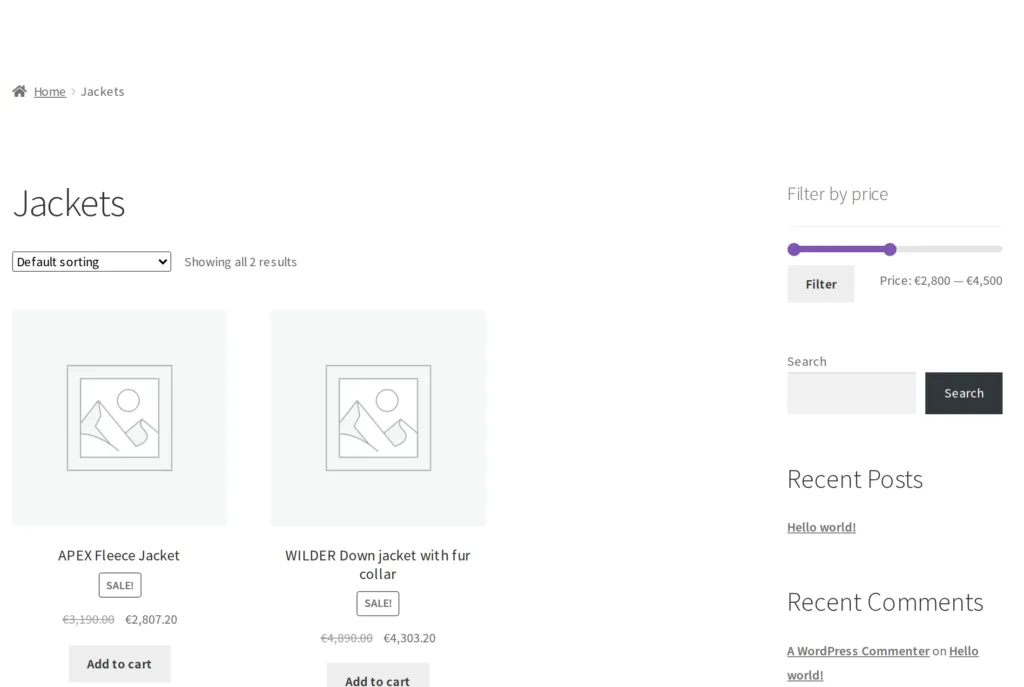
A shopper filters jackets up to 4,500. Your 4,890 jacket is on sale at 4,303.20, and it is nowhere to be seen, because WooCommerce filters and sorts on the price stored in the product, not the one painted on the page. Sort by price and your sale lands in the wrong place. Your best deal of the year, hidden from the people looking for it.

Write real sale prices instead and you hit the other wall: saving products one at a time through WooCommerce. On a big catalogue that is a long wait on sale morning, and the same wait again to put every price back when the sale ends.

Now picture sale morning done right. You save one rule over your first coffee and the whole Clothing category is on sale before the cup is cold. Shoppers who filter by price land straight on your deals instead of scrolling past them. At midnight the sale ends and every price puts itself back while you sleep.

Price Discounts fixes both. One save writes real sale prices into every product the rule covers in a single bulk write, then hands WooCommerce’s save hooks to 4 parallel workers. When the sale is over, every product gets its own price back. No spreadsheet of what you changed. No Monday morning putting prices back by hand. You run the sale; the store does the work.

Sale prices live 40x faster than saving one by one

2,200 sale prices live in about 2.5 s and every WooCommerce hook done in about 13 s with 4 workers, versus over 100 s saving them one by one.

Put 2,200 products on sale

The same 2,200 products, both ways, on the same machine.

Real time. Every clock shows real seconds.

WooCommerce save(), one product at a time: 101-113 s
Price Discounts: every hook done, 4 workers: about 13 s
Price Discounts: all 2,200 sale prices live: about 2.5 s

Measured on the Super Speedy dev box, 27 November 2026, Price Discounts 0.4.2 with Super Speedy Filters and Redis active: WooCommerce’s own save() one product at a time against Price Discounts’ bulk write followed by WooCommerce’s save hooks on 4 parallel workers. Same box, same 2,200 products (2,000 simple, 200 variations). Your server’s times will differ; the gap is the point.

Filter up to 4,500 and the sale is right there

Because the sale price is real, WooCommerce’s price filter and price sorting use it. The 4,890 jacket at 4,303.20 shows up, Sale badge and all.
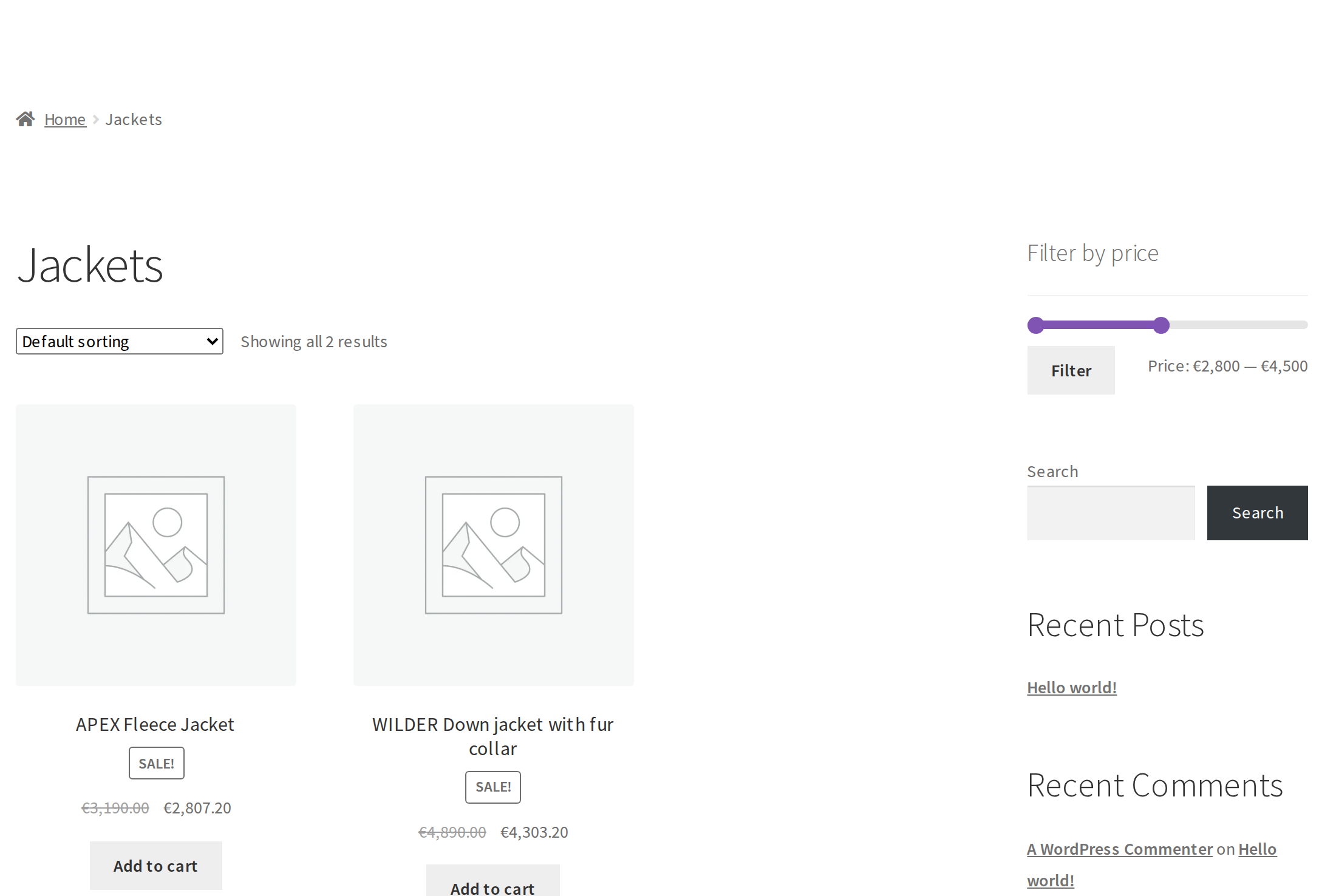
After: the shopA WooCommerce Jackets category page filtered by price from 2,800 to 4,500 euros. It shows APEX Fleece Jacket at 2,807.20 euros, was 3,190.00, and WILDER Down jacket with fur collar at 4,303.20 euros, was 4,890.00, both with a Sale badge.
The shop filtered to a maximum price, showing a discounted jacket with its regular price struck through.
Super Speedy Filters
Filter plugins read the stored price, so they see the sale too.
Basket and checkout
The shop, product page, basket, checkout and order all use the discounted price, variations included.

Measured, shown on screen, and backed by a 60-day guarantee

No reviews yet: Price Discounts is brand new. Here is everything you can check today.

40x
faster to get every sale price live than saving each product one by one
8x
faster with every WooCommerce hook done, on 4 parallel workers
2
database queries to save a sale, however many products it covers
0
extra database queries a rule adds to a page

One rule puts a whole category on sale

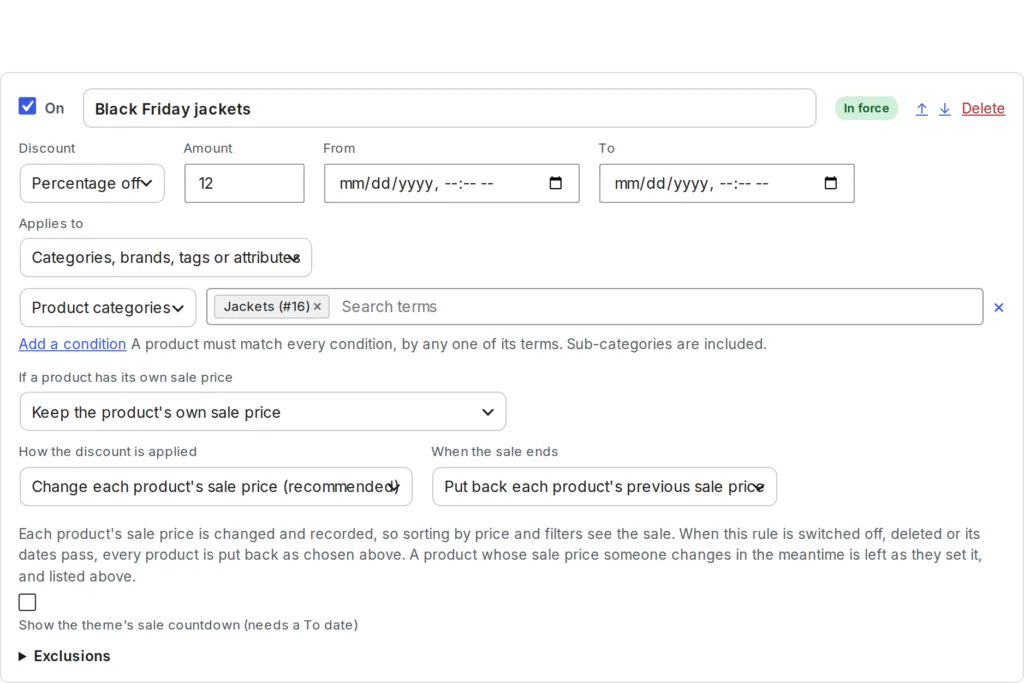
Pick the discount, pick what it covers, choose what happens when the sale ends, and save. The rule tells you how many products it covers before you commit.
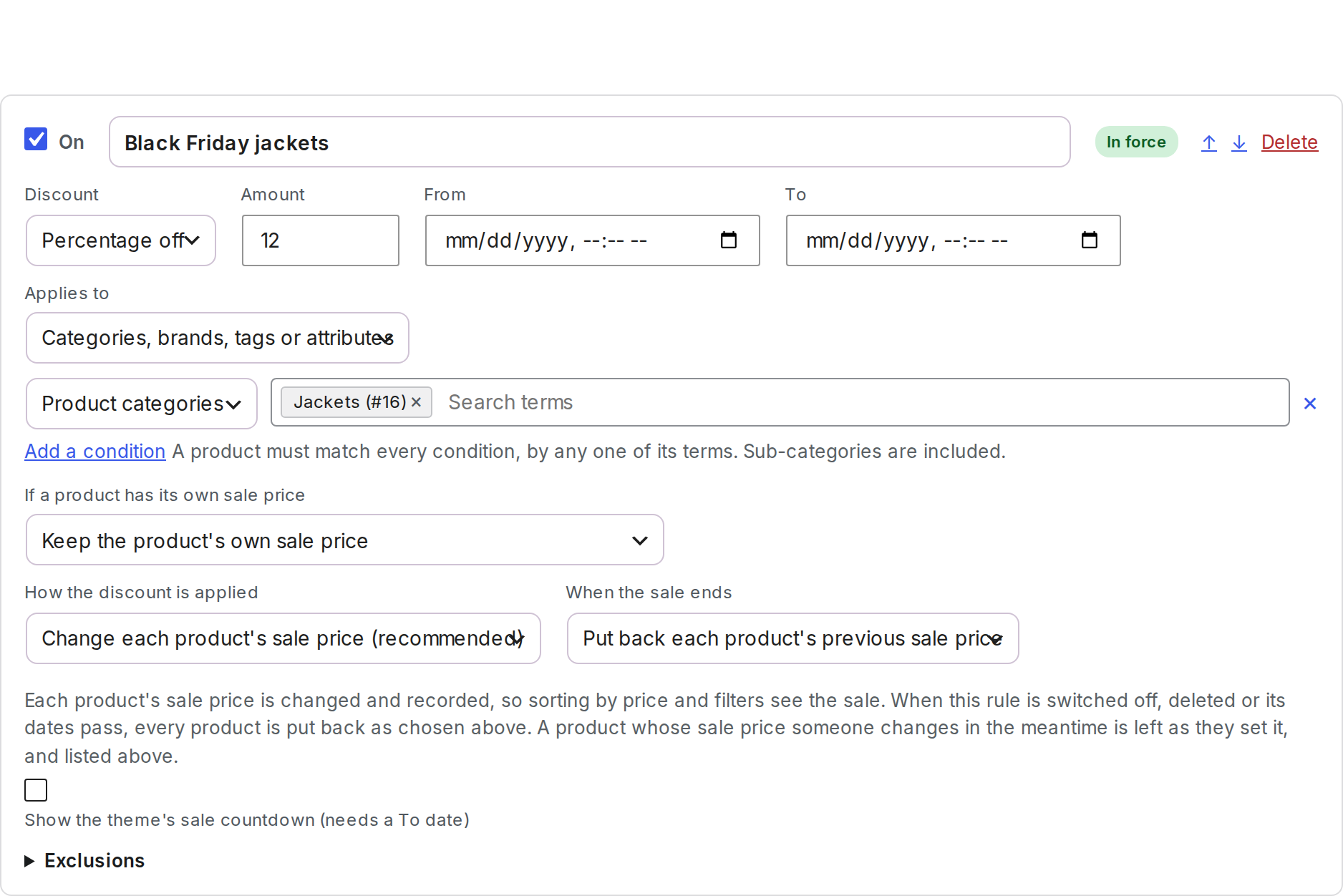
Screenshot: the Discounts tabA Price Discounts rule named Black Friday jackets: 12 percent off, applied to the Jackets product category, with How the discount is applied set to Change each product's sale price (recommended) and When the sale ends set to Put back each product's previous sale price. The rule shows In force.
A rule set to change each product’s sale price, and to put back each product’s previous sale price when the sale ends.
Real sale prices by default
Sorting and filtering by price use the sale from the moment you save.
You decide how it ends
Put back each product’s previous sale price, or remove the sale price altogether. Per rule.
Start and stop on the minute
Optional From and To times on your site clock.

Shoppers see the sale before the progress bar finishes

The sale price is in every product the moment the save returns. WooCommerce’s save hooks then run for every changed product, so feeds, search indexes and filter plugins catch up while you get on with your day.
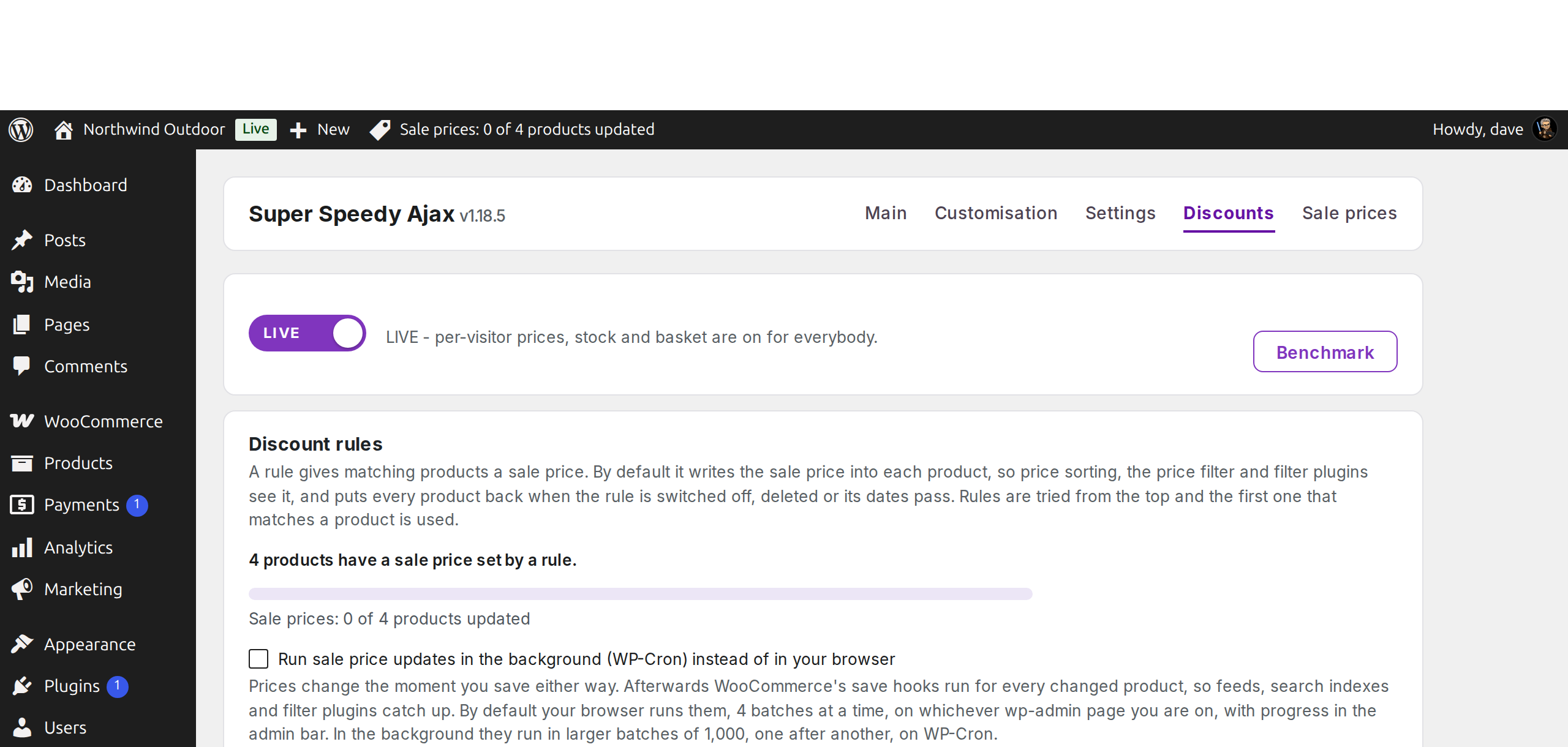
Screenshot: while the sale goes inThe Discounts tab of Super Speedy Ajax in LIVE mode. The admin bar reads Sale prices: 0 of 4 products updated, the panel says 4 products have a sale price set by a rule, with a progress bar and the option to run sale price updates in the background on WP-Cron instead.
Progress in the wp-admin bar while WooCommerce’s save hooks run for the changed products.
4 workers, in your browser
The hooks run 4 batches at a time on whichever wp-admin page you are on, with progress in the admin bar.
Or hand it to WP-Cron
Tick “Run sale price updates in the background” and they run on WP-Cron in larger batches.

Every discounted product tagged at a glance

A purple tag with the discount sits beside the price of every product a rule has put on sale. Scan the list and you know exactly what is in the sale.
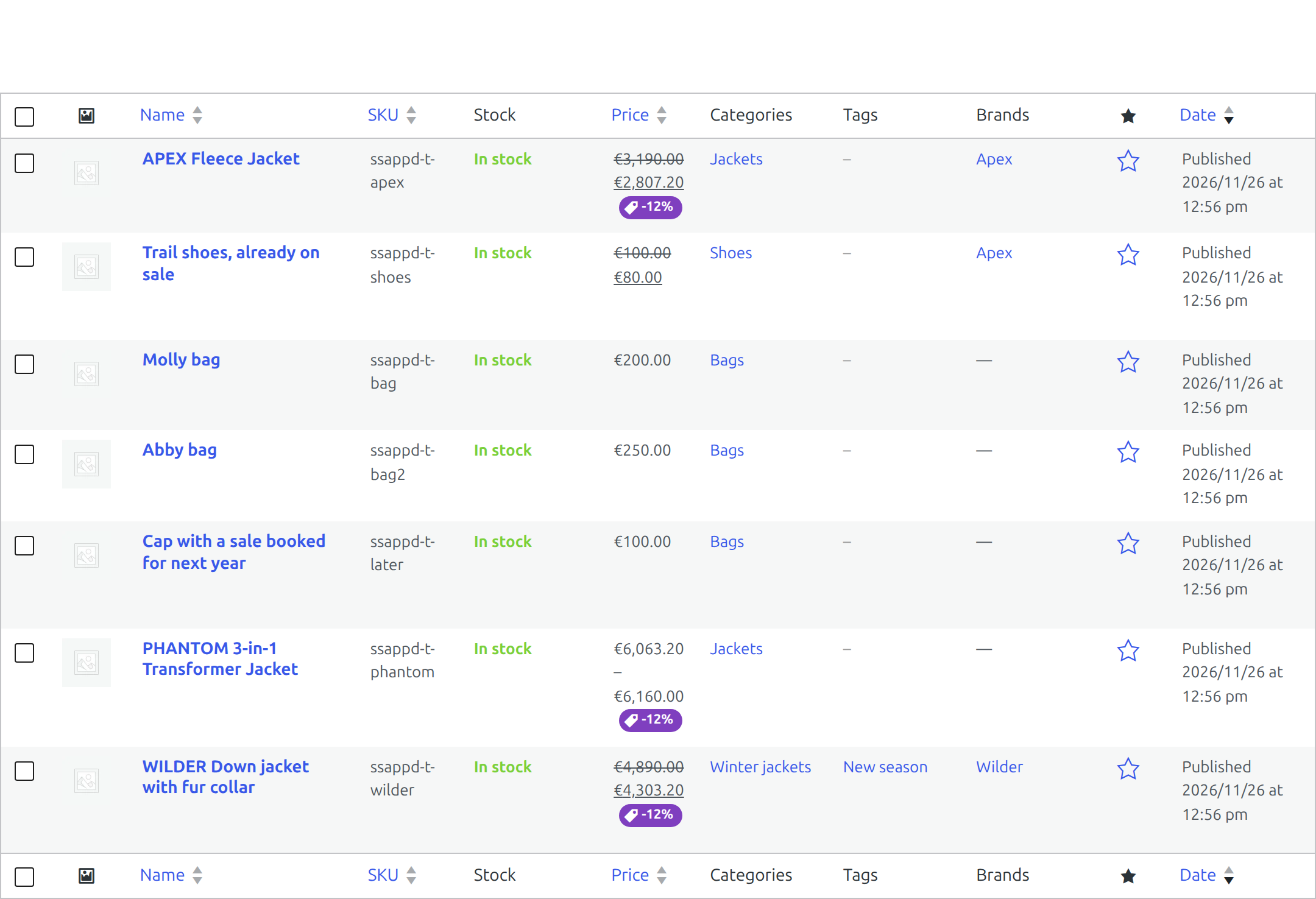
Screenshot: the Products listThe WooCommerce Products list. APEX Fleece Jacket, PHANTOM 3-in-1 Transformer Jacket and WILDER Down jacket each show their regular price struck through, the sale price, and a purple -12% tag from the discount rule. Bags and a pair of shoes without the rule have no tag.
The WooCommerce Products list with a rule’s discount tag beside each discounted price.
Variable products too
A variable product gets the tag when a rule set any of its variations’ prices.
Always traceable
The Products list, the Sale prices tab and the product edit screen all name the rule that set a price.

Hand edits stay yours, and get listed for you

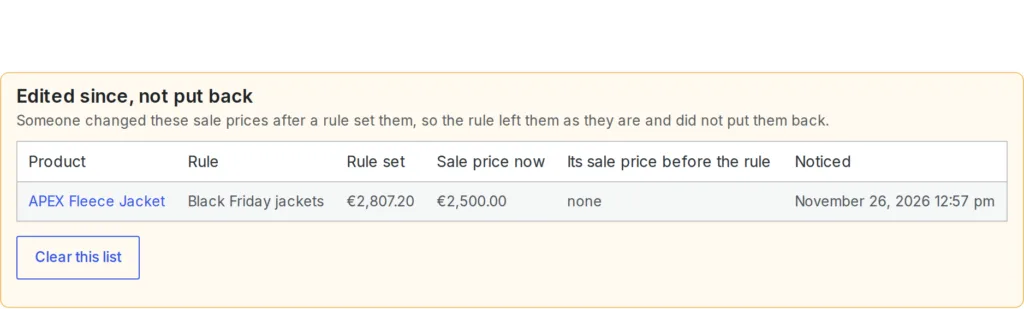
Someone changes a product’s sale price while a sale is running? The rule stops managing that product. It never overwrites the new price, and it never puts it back afterwards.
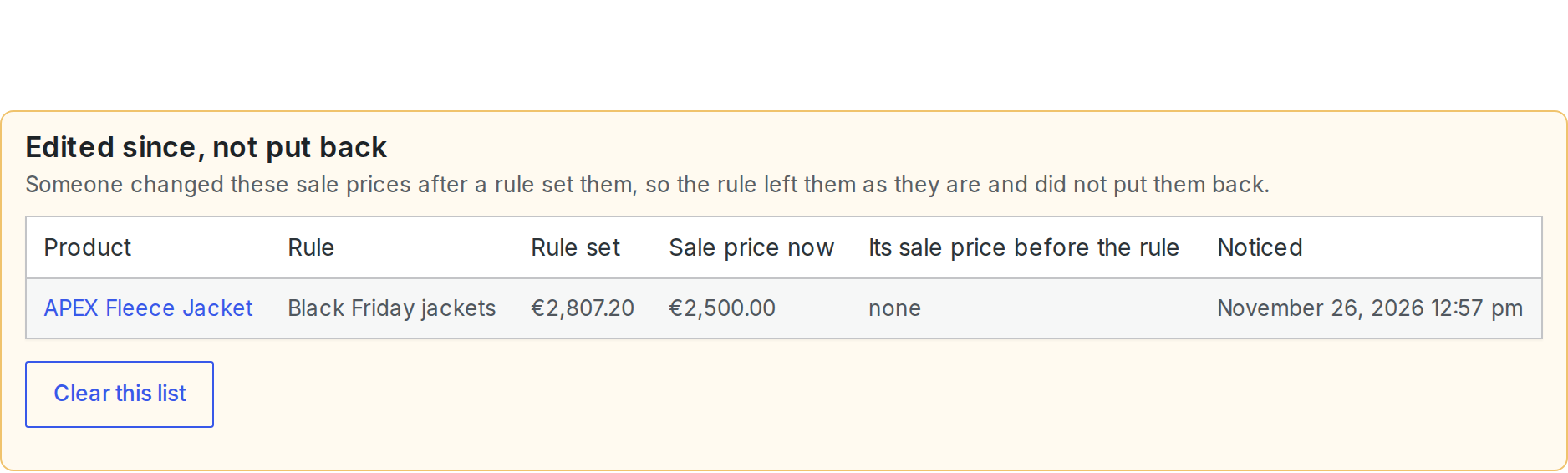
Screenshot: Edited since, not put backThe Edited since, not put back list on the Discounts tab: APEX Fleece Jacket, rule Black Friday jackets, rule set 2,807.20 euros, sale price now 2,500.00 euros, its sale price before the rule none, with a Clear this list button.
The Discounts tab’s list of products whose sale price was changed by hand during a sale.
Everything you need to decide
The rule, the price it set, the sale price now, and the sale price from before the rule.
Clear this list
Tick them off once you have checked them.

Price Discounts

  • Latest version0.4.5 (27th November 2026)
  • Last 30 days45 updates
  • Last 90 days45 updates
View changelog →

641 releases across 18 plugins in the last 90 daysLatest: Auto Infinite Scroll 1.74.17, See every update

Super Speedy Plugins

Discord community

WordPress performance server, run by Dave Hilditch of Super Speedy Plugins, everyone welcome!

  • 1,040 members
  • 78 online

Join the Discord

60 days to change your mind

Every Super Speedy plugin carries a 60-day money-back guarantee. Run your next sale with Price Discounts, and if it is not for you, ask for your money back. See the refund policy.

Every way to put a WooCommerce store on sale

Category, brand, tag, attribute or hand-picked products. Percentage, amount or fixed price. Scheduled or on the spot.

Put any category, brand or tag on sale
Percentage off, a fixed amount off, or a fixed price. Apply a rule to all products, to any product taxonomy (categories, brands, tags, global attributes such as Colour or Size), or to products you pick by name or SKU. Combine conditions, and sub-categories are included.
Real sale prices that sort and filter
The default for every rule. The discounted price goes into each product's Sale price field in one bulk write, live about 40x faster than saving each product one by one, and every change is recorded.
Every price back when the sale ends
Each rule chooses: put back each product's previous sale price and dates, or remove the sale price. It happens when the To date passes, when you switch the rule off or delete it, and when Price Discounts or Super Speedy Ajax is deactivated.
Hand edits never overwritten
A sale price someone changes by hand during a sale is never overwritten and never put back. It is listed under "Edited since, not put back" with the rule, the price it set, the price now and the price before.
Sales that start and stop on their own
From and To dates on the site clock. Tick "Show the theme's sale countdown" and themes such as Woodmart count down to the rule's end. The page cache is purged when a sale starts or ends, through WP Rocket, LiteSpeed Cache, W3 Total Cache, WP Super Cache, SG Optimizer, Nginx Helper or Cachify.
Preview the sale before shoppers see it
While Super Speedy Ajax is in TEST mode, a rule reads "Test link only": it writes nothing and discounts nothing for ordinary visitors. Click Preview the sale to see exactly what shoppers will see, then Go LIVE and the sale is on.
A Sale page that fills itself
Discounted products appear in the On Sale and Product Collection blocks, the sale products shortcode, the Store API and REST API on_sale filter, and the Products widget.
Bulk-edit the prices that need their own
The Sale prices tab lists every product and variation with its own sale price, filtered by category, name, SKU or sale status. Set, schedule or remove sale prices in bulk, saved through WooCommerce so every plugin's hooks run.

Open any product and see which sale set its price

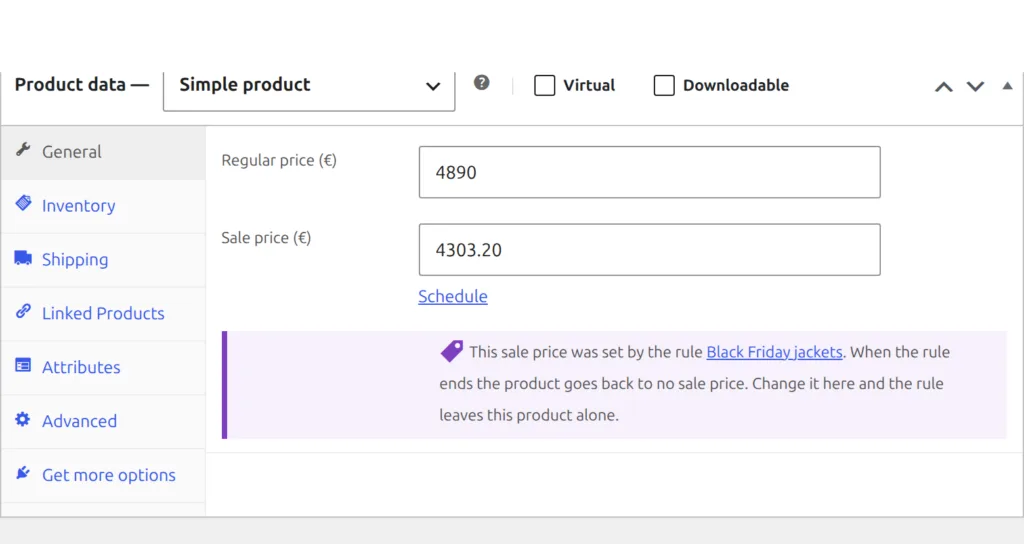
A note under the Sale price field names the rule and says exactly what the product goes back to when the rule ends.
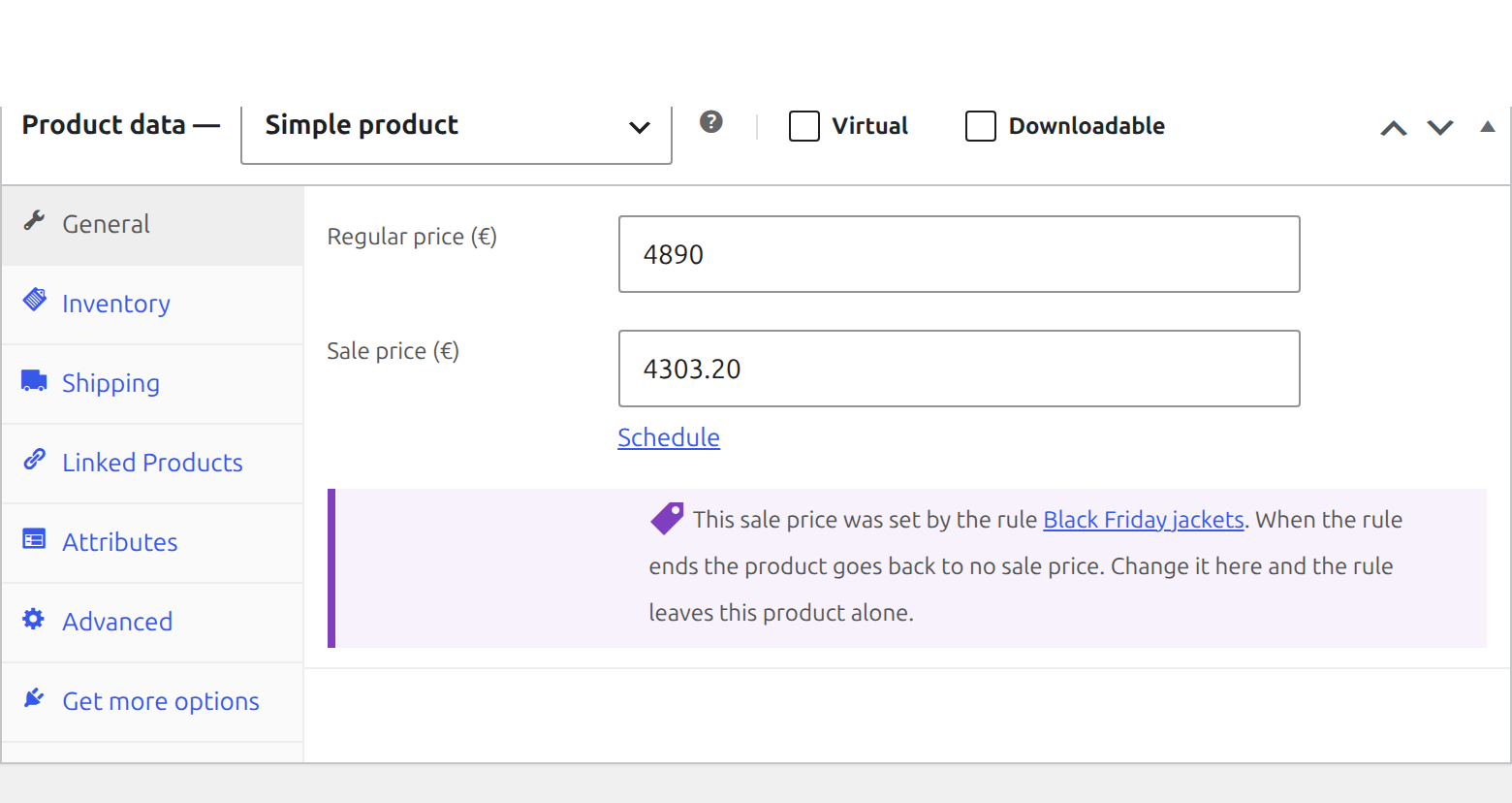
Screenshot: the product edit screenThe WooCommerce product data panel for a jacket: Regular price 4890, Sale price 4303.20, and a purple note reading: This sale price was set by the rule Black Friday jackets. When the rule ends the product goes back to no sale price. Change it here and the rule leaves this product alone.
The product data panel with the rule's note under the Sale price field.
No more "who changed this price?"
Your whole team can see which sale a price belongs to without asking.

Thousands of sale prices changed without a timeout

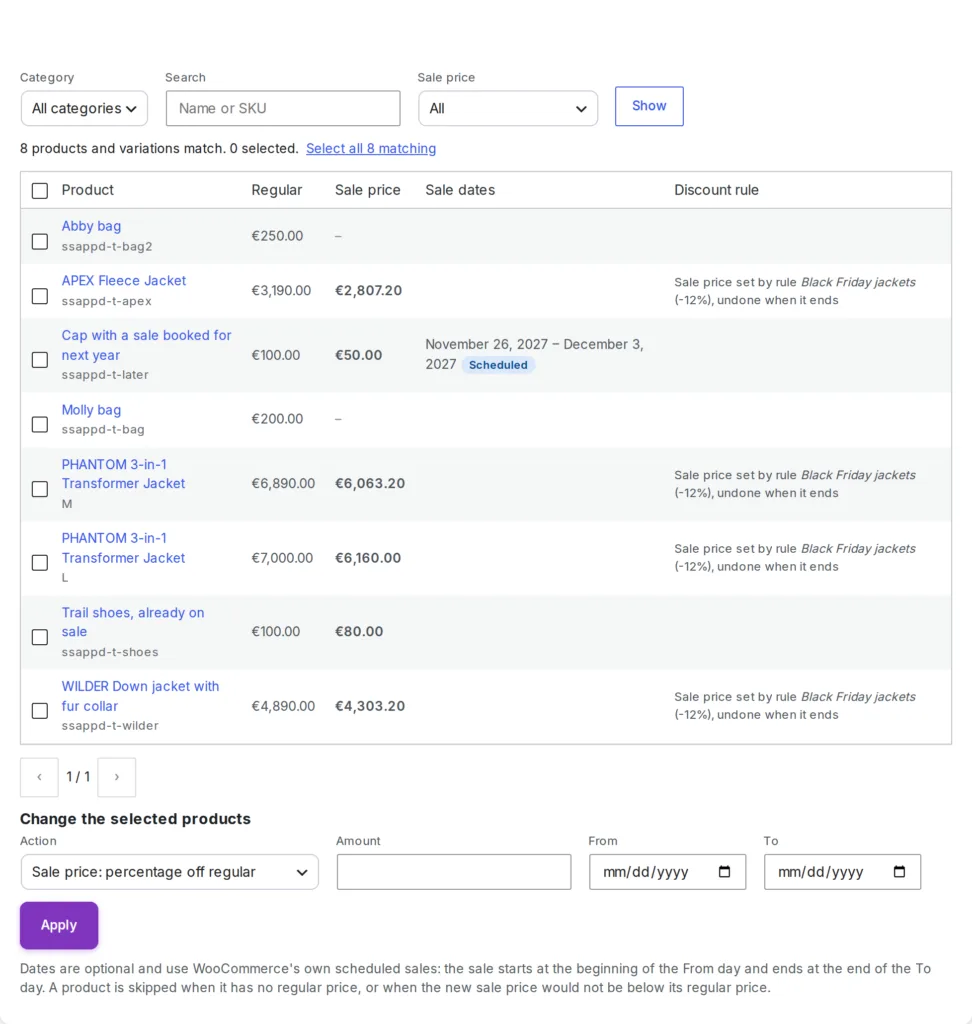
Find every product and variation with a sale price of its own, tick them, and set a percentage or amount off regular, a fixed price, or remove the sale. Add WooCommerce sale dates if you like.
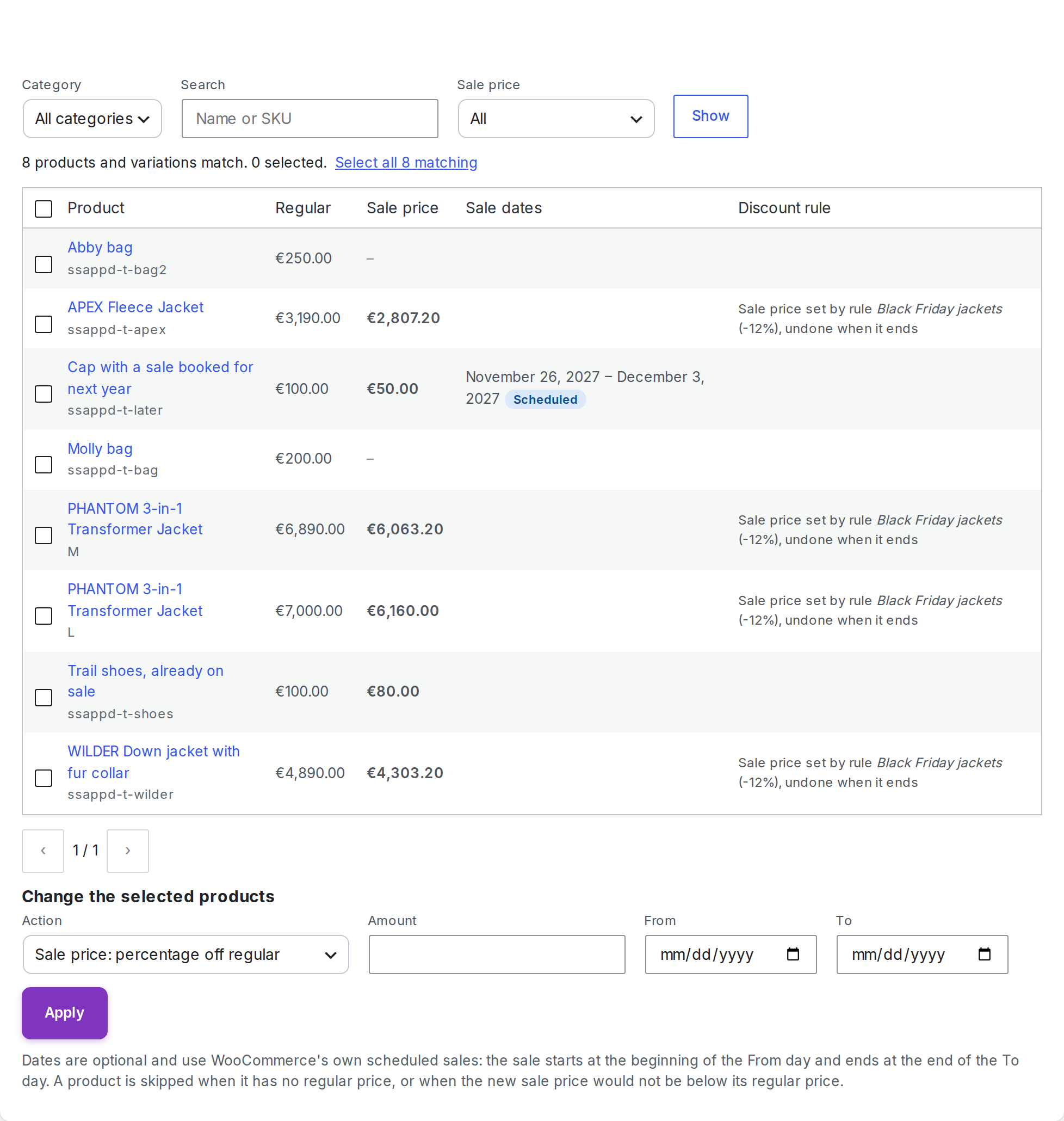
Screenshot: the Sale prices tabThe Sale prices tab listing eight products and variations with regular price, sale price, sale dates and discount rule. Three jackets read Sale price set by rule Black Friday jackets (-12%), undone when it ends; a cap has a sale scheduled for next year. Below is the Change the selected products form with action, amount and From and To dates.
The Sale prices tab listing products and variations with their regular price, sale price, sale dates and the rule that applies.
Saved through WooCommerce
Each product is saved exactly as if it had been edited on its own screen, so feeds, search indexes and stock sync see the change.
Batches with a progress bar
A big run is sent in batches, so it never times out.

Your first sale live in five steps

Create your first sale
Click Create a sale on Price Discounts in your Plugins list, or open Super Speedy > Ajax > Discounts, then click Create your first sale. Give it a name your team will recognise, such as "Black Friday jackets".
Choose the discount
Percentage off, amount off or a fixed price, and what it applies to: everything, a category, a brand, a tag, an attribute or products you pick.
Decide when it ends
Add From and To times if you want it scheduled, and choose what each product gets back when the sale ends.
Save and preview
Save. The rule shows what it covers, and Preview the sale opens your shop through your test link, exactly as shoppers will see it.
Go LIVE
Super Speedy Ajax starts in TEST mode, so shoppers see nothing until you click Go LIVE on the Discounts tab. Then the sale is on: open the shop, sort by price, use the price filter, and the sale is everywhere.

Run your next sale on real prices

Pick a plan below. Every plan is backed by the 60-day money-back guarantee.

Launching before Christmas, and included in every All Access Pass. Leave your email and you will hear the day it is out.

Enter your email address below for early access.

12 more ways it saves you work on sale day

  • See how many products a rule covers before you save
  • Exclude products or terms from any rule
  • Rules are ordered: the first match wins, so rules never stack
  • A discount never raises a price
  • Per rule: keep a product's own sale price, use whichever is lower, or discount the sale price as well
  • Display-only mode for a flash sale that changes no product at all
  • The theme's sale countdown for rule discounts, Woodmart included
  • Free gifts from Woodmart and other plugins keep their own basket price
  • A hook to purge any other page cache when a sale starts or ends
  • WooCommerce save hooks in your browser, or in the background on WP-Cron
  • Shop, product page, basket, checkout and orders all use the discounted price
  • Deactivating the add-on or Super Speedy Ajax puts every product back first

Every question answered before you buy

Do I need Super Speedy Ajax as well?
Yes. Price Discounts is an add-on for Super Speedy Ajax, and needs version 1.9.3 or later plus WooCommerce. It appears as the Discounts and Sale prices tabs on the Super Speedy Ajax settings page.
Does it change my products?
By default, yes, and that is the point: a rule writes the discounted price into each product's Sale price field, so sorting and filtering by price see the sale. Every change is recorded and undone when the sale ends. If you would rather change nothing, choose "Display only" on the rule.
How fast is it on a big catalogue?
On the Super Speedy dev box: 2,200 sale prices live in about 2.5 s and every WooCommerce hook done in about 13 s with 4 workers, versus over 100 s saving them one by one. Your server's times will differ, but the sale prices always go in with one bulk write, and the hooks run in the background while you work.
Does it work with Super Speedy Filters and the WooCommerce price filter?
Yes, with the default real sale prices. WooCommerce's price sorting, its price filter, and filter plugins such as Super Speedy Filters use the sale price.
Which page caches does it clear?
WP Rocket, LiteSpeed Cache, W3 Total Cache, WP Super Cache, SG Optimizer, Nginx Helper and Cachify are purged when a sale starts or ends and when rules are saved. Anything else can listen for the ssappd_purge_page_cache action.
What happens when the sale ends?
Each rule has a "When the sale ends" setting. The default puts back each product's previous sale price and sale dates, so a sale it had booked for later comes back as booked. The other choice removes the sale price altogether.
What if someone edits a price during the sale?
The rule stops managing that product. It does not overwrite the new price during the sale, and it does not put the product back afterwards. The product is listed on the Discounts tab under "Edited since, not put back".
Can I try a sale before customers see it?
Yes. While Super Speedy Ajax is in TEST mode, a rule writes nothing and discounts nothing for ordinary visitors; click Preview the sale to see it through your test link. Click Go LIVE and the sale prices are written.
What does it not do?
Quantity tiers, role discounts, buy-one-get-one offers, gift rules and basket-level discounts are not part of this add-on. A theme whose Sale page runs its own database query, instead of WooCommerce's sale listings, does not see rule discounts.
How do I get help?
Every plan includes a support seat: chat live with the engineers in the Super Speedy Discord.
What happens when the licence year ends?
Yearly plans include a year of updates and support, and the plugin keeps working afterwards. Renew at 30% off to keep getting updates and support.
Can a yearly licence be upgraded to lifetime?
Yes. Upgrade within 60 days and the original payment counts in full, so only the difference is paid. See upgrade and renewal discounts.
Is there a guarantee?
Every Super Speedy plugin carries a 60-day money-back guarantee. See the refund policy.

Step-by-step guides and every release in the open

Set up your first sale from the guides, and see exactly what changed in each version.

What's new in Price Discounts?

View full changelog →
0.4.5 (27th November 2026)
  • Updated super-speedy-settings to 1.16.0 the Super Speedy screen gains plugin pages, recommendations for this site, free trial requests and deals, and licence rows show free trials.
0.4.4 (27th November 2026)
  • After Save in TEST mode the notice says the settings are saved and points to the note above the rules, instead of repeating it with a second pair of buttons.
  • A rule waiting for Super Speedy Ajax to go LIVE is labelled "TEST mode", the same name the banner and toggle use.
  • The Discounts and Sale prices tabs link to their guides in the Knowledge Base.
0.4.3 (27th November 2026)
  • Corrected the speed figure in the 0.4.0 entry to the one measured on this release.
0.4.2 (27th November 2026)
  • Changed a rule's badge to "Test link only" while Super Speedy Ajax is in TEST mode, with a banner above the rules and after Save: "Shoppers do not see these rules yet", plus Preview the sale and Go LIVE buttons.
  • Changed activation without Super Speedy Ajax: the add-on now activates and shows "Price Discounts needs Super Speedy Ajax 1.9.3 or later" with links to download it, instead of WordPress's error page.
  • Deactivating Super Speedy Ajax now puts back every product a rule changed, as deactivating this add-on does.
  • Added a "Create a sale" link on the add-on's row in the Plugins list and a one-time "Price Discounts is active: create your first sale" notice.
  • The Discounts tab now opens with a "Create your first sale" button when there are no rules; the WP-Cron, cache purge and information boxes are under Advanced.
  • Each rule now says what it covers before you save, for example "Covers 11 products (19 including variations); 1 keeps its own sale price."
  • After going LIVE the Discounts tab writes the sale prices straight away and says "Writing sale prices..." instead of "0 products".
  • The product count now counts a variable product once, not once per variation.
  • Choosing "Categories, brands, tags or attributes" now adds the first condition on Product categories; internal taxonomies such as POS product visibility are no longer offered; term IDs are gone from the labels; the search list closes after a choice; a new rule reads "Not saved".
  • Fixed long option labels running under the arrow of a rule's dropdowns, and the countdown checkbox sitting above its label.
  • Added a line on the Discounts and Sale prices tabs saying which to use.
  • Fixed a PHP 8.4 deprecation notice from SSAPPD_Real_Prices::active_rows().
Be the first to review Price Discounts

Reviews

There are no reviews yet.

Be the first to review “Price Discounts”